Six chambers. Six methods. You don’t get to pick.
The idea is simple: give the tool a file, it randomly selects one of six encryption or obfuscation techniques, and spits out encrypted.bin on your Desktop. Your job — or your victim’s job — is to open it in Ghidra, figure out what happened, find the hardcoded key, and write the decryption routine.
No hints. No readme. Just relax, fun and a binary.
How It Works
On launch, the tool rolls the die:
srand(time(0));
DWORD num = (rand() % 6 + 1);
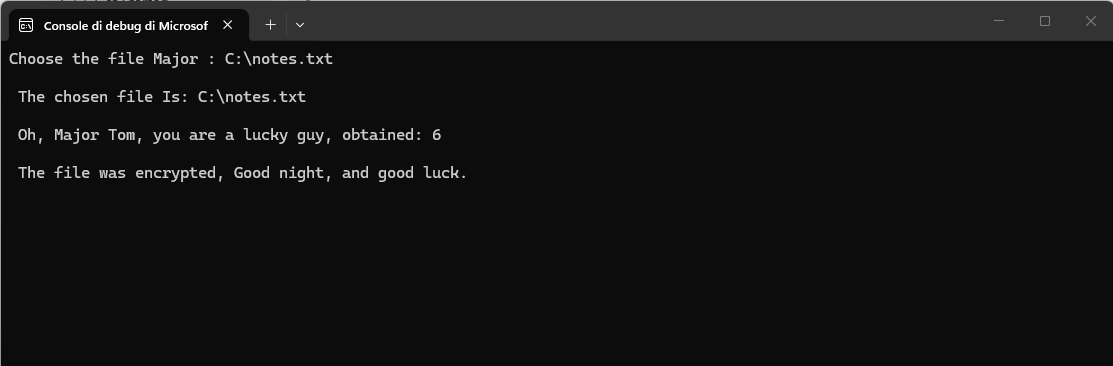
One of six methods gets applied. In the CTF build, the method number is not printed. The player gets the output file and nothing else.
The Six Chambers
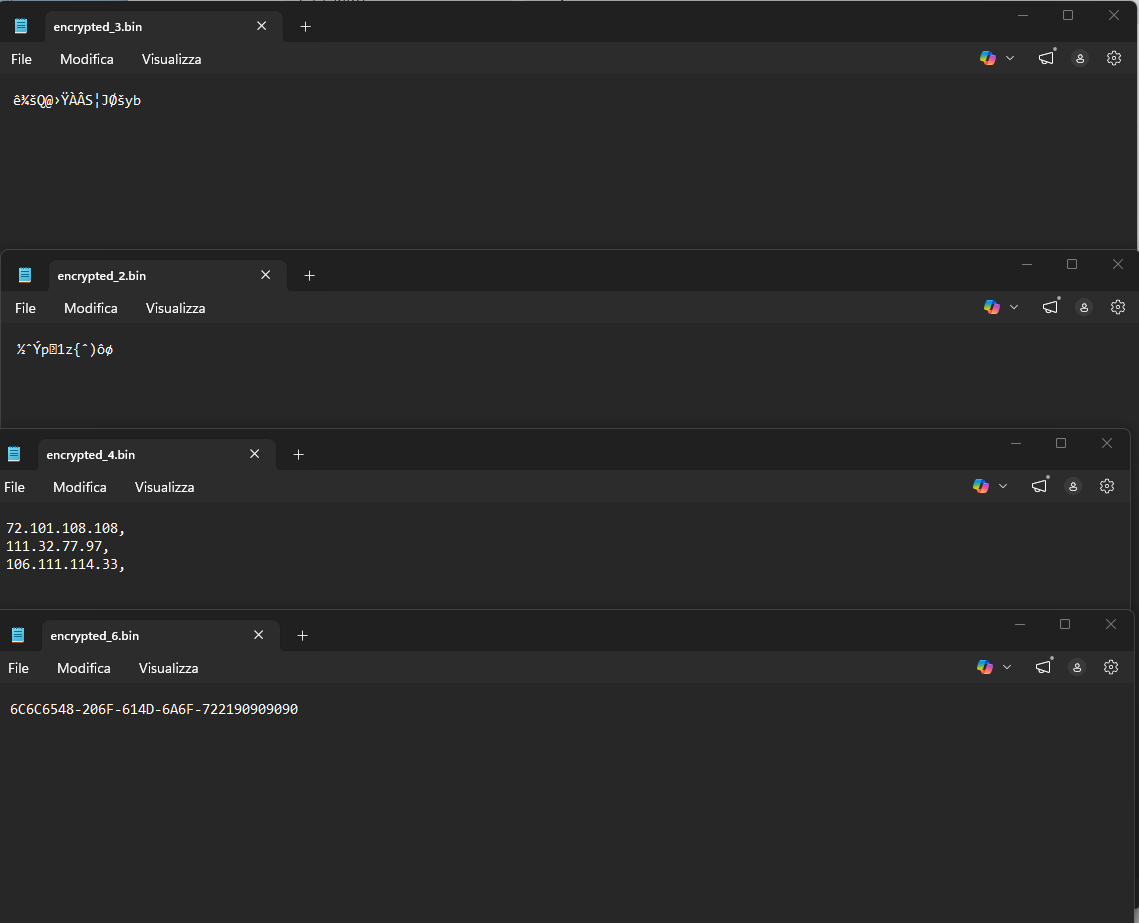
Some examples:
Chamber 1 — XOR
The classic. Simple, brutally effective, and still surprisingly common in the wild — from script kiddie droppers to actual APT implants. XOR works by combining each byte of the payload with a byte from the key using the exclusive OR operation. When the key is shorter than the payload (which it almost always is), it wraps around and repeats.
void encryptXOR(PBYTE payload, SIZE_T payloadSize, PBYTE key, SIZE_T keySize) {
    for (int i = 0, j = 0; i < payloadSize; i++) {
        if (j >= keySize) j = 0;
        payload[i] = payload[i] ^ (key[j]);
    }
}
The key "secret" is hardcoded as a static string in the binary. In Ghidra it will show up clearly in the strings view or referenced directly near the encryption routine. XOR is fully symmetric — applying the same operation twice with the same key gives you back the original plaintext. So the decryption routine is literally identical to the encryption routine. Find the key, re-run the loop, done.
This is the warmup chamber. If you land here, consider yourself lucky.
Chamber 2 — RC4 via SystemFunction032
RC4 is a stream cipher — it generates a pseudorandom keystream from the key and XORs it with the plaintext byte by byte. Unlike raw XOR, the keystream is non-repeating and derived from an internal state machine (the S-box), which makes frequency analysis and pattern recognition much harder on the ciphertext.
The interesting part here is how RC4 is called. Instead of implementing it manually or linking against a known library, the tool resolves SystemFunction032 at runtime directly from Advapi32.dll:
fnSystemFunction032 SystemFunction032 = (fnSystemFunction032)GetProcAddress(
    LoadLibraryA("Advapi32"), "SystemFunction032"
);
SystemFunction032(&Data, &Key);
SystemFunction032 is an undocumented Windows API that has been quietly doing RC4 encryption since forever. It takes two USTRING structs — one for the data, one for the key — and encrypts in place. No imports, no obvious symbol name in the IAT, just a runtime string lookup. In Ghidra the player needs to recognize the USTRING struct pattern and trace the GetProcAddress call to identify what’s actually being invoked.
Like XOR, RC4 is symmetric. Call SystemFunction032 again with the same key on the ciphertext and you get the plaintext back.
Chamber 3 — AES-256 CBC
Now we’re in serious territory. AES (Advanced Encryption Standard) in CBC (Cipher Block Chaining) mode is the real deal — the same algorithm used to protect actual sensitive data everywhere. Unlike XOR or RC4, AES is a block cipher operating on 16-byte blocks, which means the payload needs to be padded to a block boundary before encryption. CBC mode chains each block to the previous one using XOR before encrypting, which means a unique IV (Initialization Vector) is required to randomize the first block.
The tool generates both the 32-byte key and the 16-byte IV at runtime using a seeded rand():
srand(time(NULL));
GenerateRandomBytes(pKey, KEYSIZE);   // 32 bytes

srand(time(NULL) ^ pKey[0]);
GenerateRandomBytes(pIv, IVSIZE);     // 16 bytes
GenerateRandomBytes fills the buffer with rand() % 0xFF — not cryptographically secure randomness, but enough to produce values that aren’t immediately obvious. Both the key and IV end up as hardcoded byte arrays in the compiled binary. In Ghidra they appear as initialized data — the player needs to locate them, extract the raw bytes, and feed them into any AES-256-CBC implementation to decrypt.
The encryption itself goes through the Windows CNG API:
BCryptOpenAlgorithmProvider(&hAlgorithm, BCRYPT_AES_ALGORITHM, NULL, 0);
BCryptSetProperty(hAlgorithm, BCRYPT_CHAINING_MODE, (PBYTE)BCRYPT_CHAIN_MODE_CBC, ...);
BCryptGenerateSymmetricKey(hAlgorithm, &hKeyHandle, pbKeyObject, cbKeyObject, pKey, KEYSIZE, 0);
BCryptEncrypt(hKeyHandle, plaintext, size, NULL, pIv, IVSIZE, ciphertext, cbCipherText, &cbResult, BCRYPT_BLOCK_PADDING);
The output is a binary blob with no header, no magic bytes, no structure. Just encrypted data. If you land on this chamber without experience with CNG internals, you’re going to spend some quality time in Ghidra.
This is the chamber that makes people question their life choices.
Chamber 4 — IPv4Fuscation
No encryption here — just disguise. The goal is to make the payload look like something completely innocent to a casual observer or a naive signature scanner. The technique, sometimes called IPFuscation, was notably used in the wild by Hive ransomware.
Every 4 bytes of the payload are converted into a dotted-decimal IPv4 address, where each byte becomes one octet:
0xFC 0x48 0x83 0xE4 → "252.72.131.228"
The output file is a plain text list of quoted IP addresses. Open it in a text editor and you see what looks like a network log or an IP blocklist. Nothing suspicious. No high-entropy binary blob. No obvious shellcode.
Since IPv4 addresses require exactly 4 bytes each, the payload must be padded to a multiple of 4 before encoding. NOP bytes (0x90) fill the gap:
if (size % 4 != 0)
    paddedSize = size + (4 - (size % 4));

for (SIZE_T i = size; i < paddedSize; i++)
    buf[i] = 0x90;
To reverse the obfuscation: parse each IP string, convert each decimal octet back to its hex byte value, and concatenate all bytes in order. The Windows API RtlIpv4StringToAddressA from ntdll.dll does exactly this — it converts an IPv4 string directly to a 4-byte binary representation.
The challenge here isn’t the reversal itself — it’s recognizing that a list of IP addresses is the payload in the first place.
Chamber 5 — MAC Address Obfuscation
Same philosophy as IPv4Fuscation, different format. This time every 6 bytes of the payload become a MAC address in AA-BB-CC-DD-EE-FF notation:
sprintf_s(Output, "%0.2X-%0.2X-%0.2X-%0.2X-%0.2X-%0.2X", a, b, c, d, e, f);
The output file looks like a dump of network interface hardware addresses — the kind of thing you’d see in a device table or an ARP cache. Each line is a perfectly formatted MAC address, visually plausible, structurally unremarkable.
Padding to the nearest multiple of 6 is applied before encoding, again using 0x90 NOP bytes. Reversing is mechanical: split each MAC by the - delimiter, parse each hex pair as a byte, rebuild the buffer in order. There’s no byte reordering here — what goes in comes out in the same sequence.
Where this gets interesting from a detection evasion perspective: MAC address strings don’t trigger many heuristics. A binary full of strings like A1-B2-C3-D4-E5-F6 looks completely different from a binary full of high-entropy data or obvious shellcode patterns.
Chamber 6 — UUID Obfuscation
The most visually convincing and technically annoying of the three obfuscation methods. Every 16 bytes of the payload become a UUID (Universally Unique Identifier) in the standard xxxxxxxx-xxxx-xxxx-xxxx-xxxxxxxxxxxx format.
The output file looks like a list of GUIDs — the kind of thing Windows generates constantly for COM objects, registry entries, and installer packages. Completely unremarkable at a glance.
The catch is byte ordering. The UUID format follows the mixed-endian convention defined in RFC 4122: the first three fields are stored in little-endian order, meaning the bytes are reversed compared to their order in memory. The tool replicates this correctly:
sprintf_s(Output0, "%0.2X%0.2X%0.2X%0.2X", d, c, b, a);   // 4 bytes, reversed
sprintf_s(Output1, "%0.2X%0.2X-%0.2X%0.2X", f, e, h, g);  // 2+2 bytes, reversed
sprintf_s(Output2, "%0.2X%0.2X-%0.2X%0.2X", i, j, k, l);  // stored as-is from here
sprintf_s(Output3, "%0.2X%0.2X%0.2X%0.2X", m, n, o, p);
This is where players get burned. If you parse the UUID naively — reading hex pairs left to right — you get garbage. You have to account for the endianness reversal in the first two fields. The correct approach is to use UuidFromStringA (from rpcrt4.dll), which handles the conversion properly and gives you back the original 16 bytes in the right order.
Padding to a multiple of 16 is applied before encoding, and trailing 0x90 bytes need to be stripped from the recovered payload after decoding.
Output
The encrypted file always lands on the Desktop:
_dupenv_s(&username, &len, "USERNAME");
snprintf(outPath, sizeof(outPath), "C:\\Users\\%s\\Desktop\\encrypted.bin", username);
For encryption methods (XOR, RC4, AES) the output is a raw binary file. For obfuscation methods (IPv4, MAC, UUID) the output is a plain text file with one encoded entry per line. Both are written as encrypted.bin — another small hint for the player to figure out.
The Challenge Format
- The tool encrypts or obfuscates a file containing a secret message or flag
- The player receives only
encrypted.bin— no method, no key, no context - Open in Ghidra, identify the method from code patterns and output structure
- Locate the hardcoded key, IV, or recognize the encoding format
- Write the decryption or deobfuscation routine and recover the original content
The difficulty variance is intentional. XOR is a warmup. UUID with a side of AES on a bad day is a different conversation entirely. That’s the roulette.
Good night, and good luck.
Study Case — Solving Chamber 2 (RC4) from Scratch
You have encrypted_2.bin and the tool’s .exe. Nothing else. Here’s the full path from zero to plaintext.
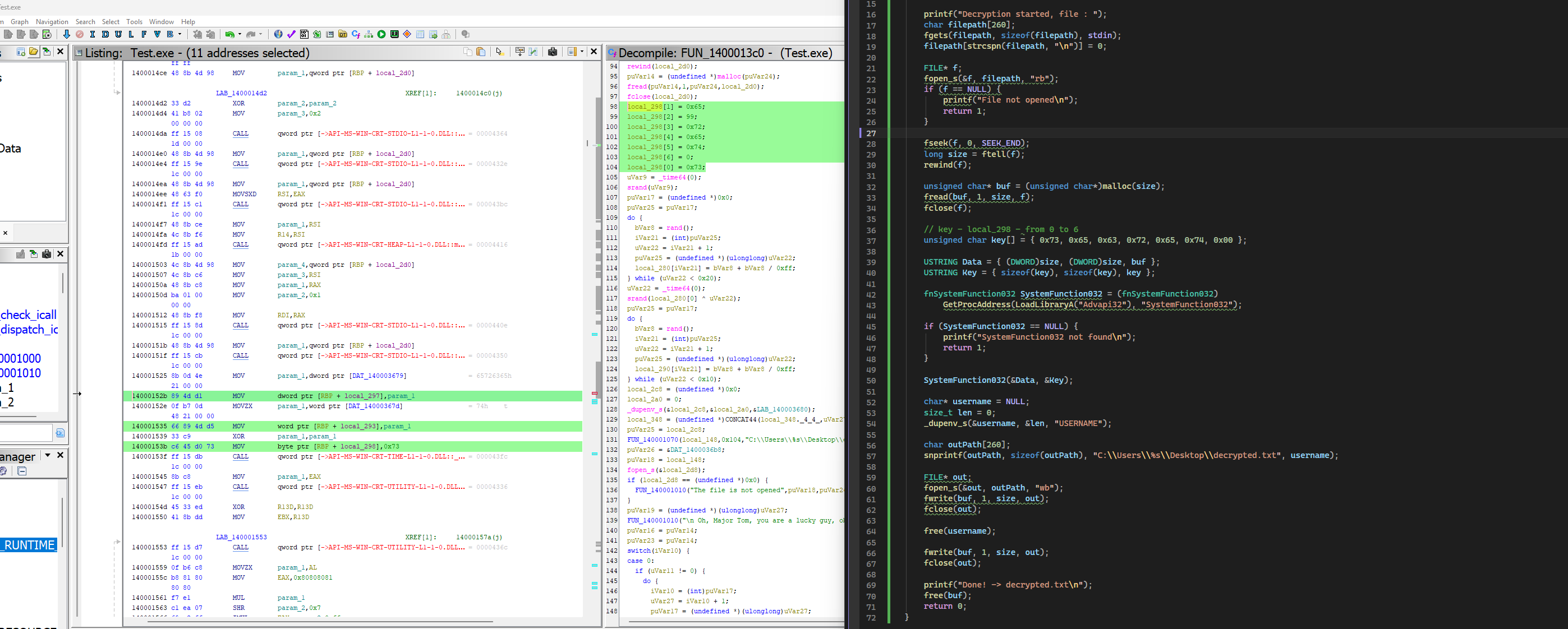
Step 1 — Entry Point: Defined Strings
Open the .exe in Ghidra. Import, Analyze, yes to everything. Once analysis completes, go to Window > Defined Strings.
You’re not searching for the key — you don’t know what it is yet. You’re searching for something you know exists in the binary: a string you wrote. Search for:
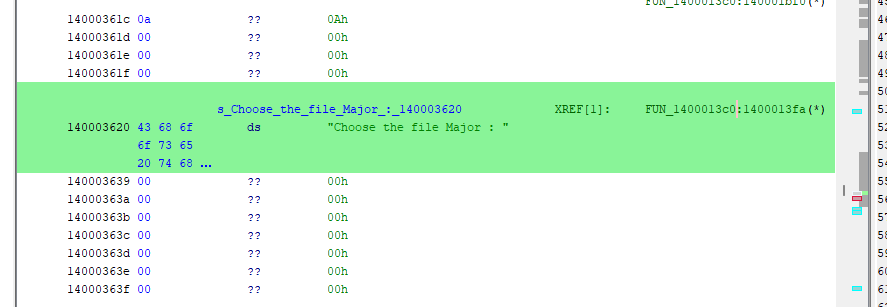
Choose
You get a hit: "Choose the file Major : ". That’s where the main function should be. Ghidra doesn’t know it’s called main — it stripped all symbols at compile time. The XREF tells you which function uses that string, and since you wrote that string in main, that function is main.
Double click the XREF — you land in FUN_1400013c0.
Step 2 — Reading the Decompiler
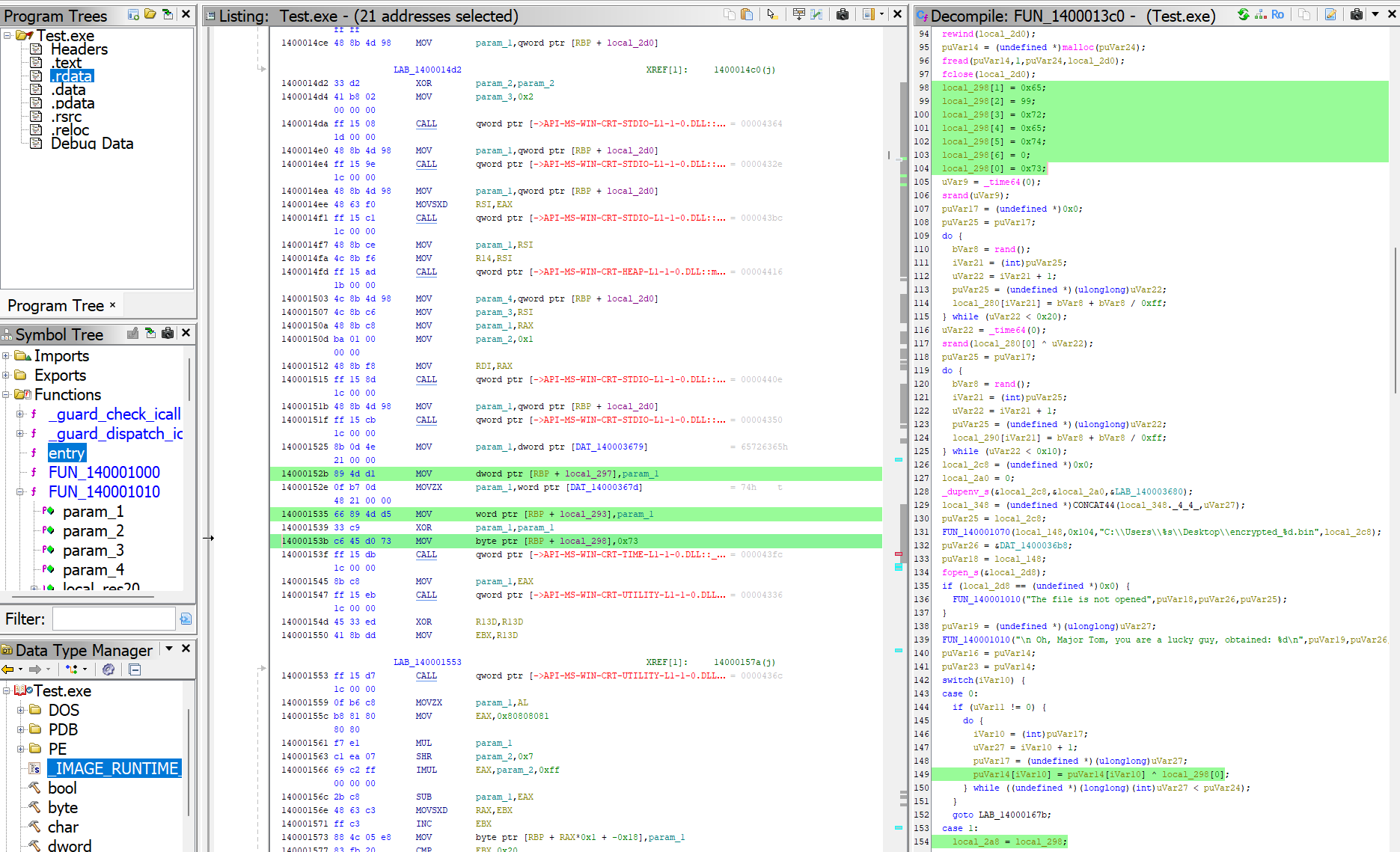
Open Window > Decompiler. You’re now looking at the reconstructed C code of main. Scroll through it. A few things immediately stand out:
First, you see a switch() — six cases. That’s the method selector. The number in the output filename (encrypted_2.bin) is 2, which maps to case 1 in the switch because the switch starts at 0 while the filename counter starts at 1.
Second, just before the switch, you see this block:
local_298[1] = 0x65;
local_298[2] = 99;
local_298[3] = 0x72;
local_298[4] = 0x65;
local_298[5] = 0x74;
local_298[6] = 0;
local_298[0] = 0x73;
An array built byte by byte with immediate values. This is suspicious. All values fall in the printable ASCII range (0x20-0x7E). Convert them:
0x73 = s
0x65 = e
0x63 = c   (99 decimal)
0x72 = r
0x65 = e
0x74 = t
0x00 = \0
That’s secret\0 — 7 bytes total. That’s the key.
Step 3 — Identifying RC4
Jump into case 1 in the switch:
case 1:
    local_2a8 = local_298;   // key goes here
    local_2c0 = CONCAT44(uVar11, uVar11);
    local_2b0 = (undefined *)0x700000007;  // Length=7, MaximumLength=7
    local_2b8 = puVar14;
    uVar12 = LoadLibraryA("Advapi32");
    pcVar15 = (code *)GetProcAddress(uVar12, "SystemFunction032");
    uVar27 = (*pcVar15)(&local_2c0, &local_2b0);
Two things confirm RC4: local_298 (the key you just found) is passed as the key argument, and the function being resolved at runtime is SystemFunction032 from Advapi32.dll. SystemFunction032 is an undocumented Windows API that implements RC4 — it takes two USTRING structs (data and key) and encrypts in place.
Note 0x700000007: this is Length=7, MaximumLength=7 packed into a 64-bit value. The key length is 7, confirming secret\0 with the null terminator.
Step 4 — Writing the Decryption Routine
RC4 is symmetric — encrypting twice with the same key gives back the original. The decryption code is identical to the encryption code. Load the ciphertext, call SystemFunction032 with the same key, write the result.
#include <Windows.h>
#include <stdio.h>
#include <string.h>
#include <stdlib.h>

typedef struct USTRING {
    DWORD Length;
    DWORD MaximumLength;
    PVOID Buffer;
} USTRING;

typedef NTSTATUS(NTAPI* fnSystemFunction032)(USTRING* Data, USTRING* Key);

int main() {

    printf("Decryption started, file : ");
    char filepath[260];
    fgets(filepath, sizeof(filepath), stdin);
    filepath[strcspn(filepath, "\n")] = 0;

    FILE* f;
    fopen_s(&f, filepath, "rb");
    if (f == NULL) {
        printf("File not opened\n");
        return 1;
    }

    fseek(f, 0, SEEK_END);
    long size = ftell(f);
    rewind(f);

    unsigned char* buf = (unsigned char*)malloc(size);
    fread(buf, 1, size, f);
    fclose(f);

    // key recovered from Ghidra — local_298, 7 bytes including null terminator
    unsigned char key[] = { 0x73, 0x65, 0x63, 0x72, 0x65, 0x74, 0x00 };

    USTRING Data = { (DWORD)size, (DWORD)size, buf };
    USTRING Key  = { 7, 7, key };

    fnSystemFunction032 SystemFunction032 = (fnSystemFunction032)
        GetProcAddress(LoadLibraryA("Advapi32"), "SystemFunction032");

    if (SystemFunction032 == NULL) {
        printf("SystemFunction032 not found\n");
        return 1;
    }

    SystemFunction032(&Data, &Key);

    char* username = NULL;
    size_t len = 0;
    _dupenv_s(&username, &len, "USERNAME");

    char outPath[260];
    snprintf(outPath, sizeof(outPath), "C:\\Users\\%s\\Desktop\\decrypted.txt", username);

    FILE* out;
    fopen_s(&out, outPath, "wb");
    if (out == NULL) {
        printf("Output file not opened\n");
        return 1;
    }

    fwrite(buf, 1, size, out);
    fclose(out);

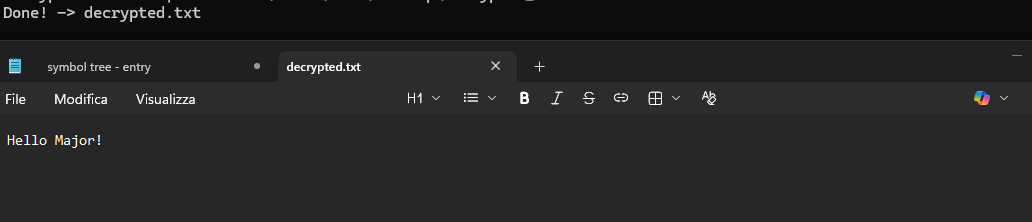
    printf("Done -> decrypted.txt\n");

    free(username);
    free(buf);
    return 0;
}
Summary — What the Player Had to Do
The full reasoning chain, in order:
- Defined Strings — find a known string, identify main via XREF
- Decompiler — read the switch, target
case 1based on filename number - Recognize the key pattern — array of byte assignments, convert hex to ASCII:
secret\0 - Identify RC4 —
GetProcAddress("SystemFunction032")= undocumented Windows RC4 API - Write decryption — same call, same key, RC4 is symmetric
No prior knowledge of the key. No symbols. Just the binary, Ghidra, and pattern recognition.
This tool was built for educational purposes — encryption practice, reverse engineering training, and CTF preparation. Use responsibly.