During an engagement you identify a technology and a version number. Maybe it’s an X-Powered-By header, a Server banner, or a version string buried in a response body. The next step is always the same: open a browser, search NVD, check CVEDetails, look for public exploits, read advisories. It’s routine, it takes time, and it pulls you out of Burp.
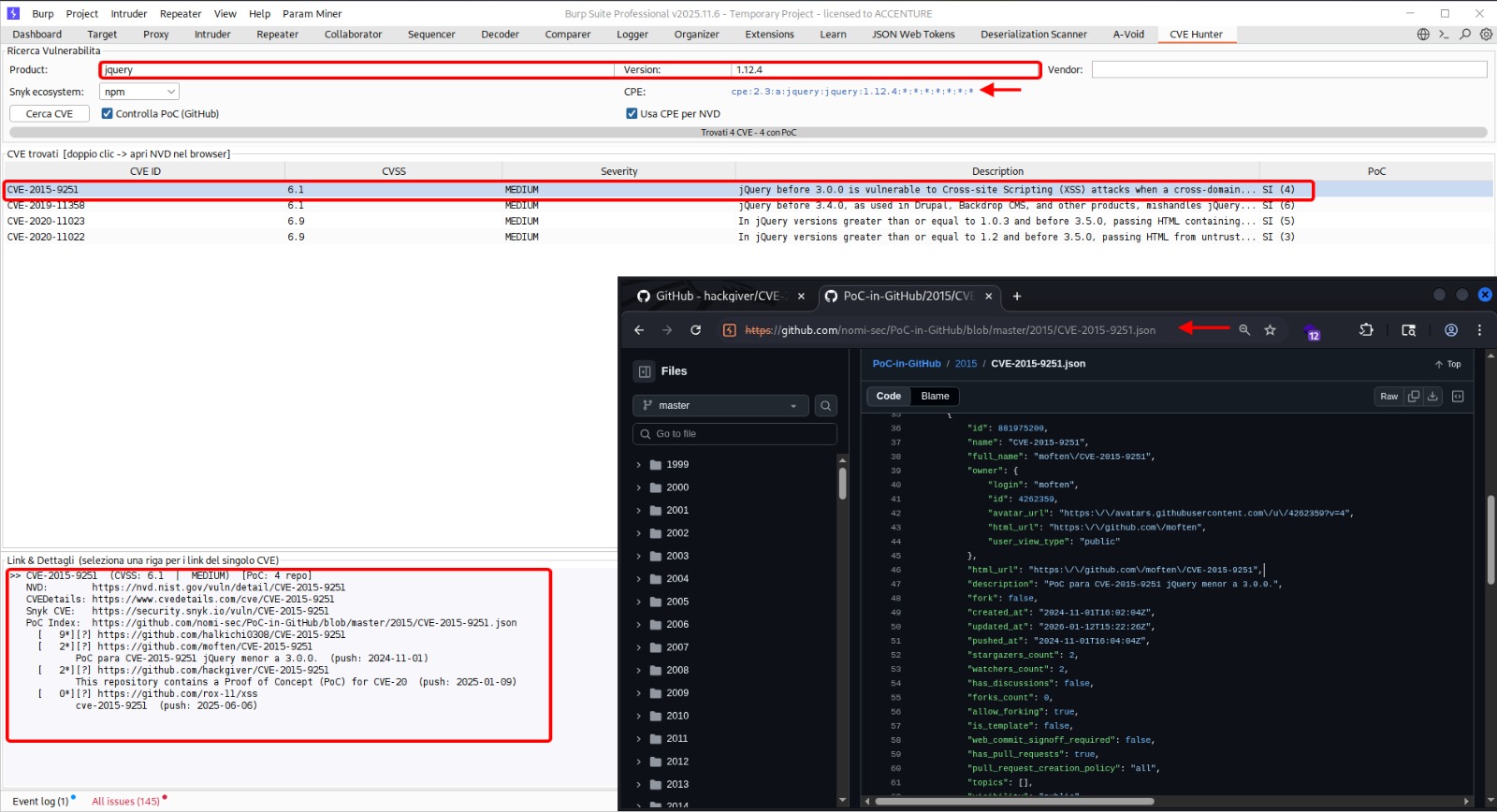
CVE-Hunter keeps you in Burp. Enter a vendor, product, and version, hit search, and the extension queries multiple sources in parallel, aggregates the results into a single table, and tells you whether a public proof-of-concept exists on GitHub.
Data Sources
CVE-Hunter queries three independent sources and cross-references a fourth:
NVD (National Vulnerability Database)
The primary source. The extension builds a CPE 2.3 string from the vendor, product, and version you provide:
cpe:2.3:a:{vendor}:{product}:{version}:*:*:*:*:*:*:*
It first attempts an exact CPE match against the NVD API v2. If that returns nothing, it falls back to a virtualMatchString query (which supports partial/wildcard matching), and finally to a keyword-based search as a last resort.
No API key is needed — NVD’s public API is rate-limited but free.
CVEDetails
A secondary source that often catches CVEs the NVD query misses, especially for products with inconsistent CPE naming. The extension searches by vendor and product name, then filters results by version on the client side.
Snyk Vulnerability Database
Covers ecosystems that NVD sometimes lags on — npm, PyPI, Maven, Go, NuGet, Composer, RubyGems, CocoaPods, Hex, Cargo, and Linux distributions. Useful when the target technology is a library or framework rather than a standalone application.
The ecosystem selector in the UI lets you narrow the search to a specific package manager.
PoC-in-GitHub (nomi-sec)
For every CVE found, the extension checks the nomi-sec/PoC-in-GitHub repository to determine if a public proof-of-concept exists. Results are displayed directly in the table — a quick way to prioritize which vulnerabilities are worth investigating first.
How It Works
The interface is a single Burp tab with three sections:
Search bar — fields for vendor, product, and version. A results-per-page selector (10 to 100) and a Snyk ecosystem dropdown. Three search buttons: NVD, CVEDetails, and Snyk.
Results table — columns for CVE ID, source, CVSS score, severity, description, and PoC availability. Sortable. Double-click any row to open the full NVD detail page in your browser.
Detail pane — displays the full description, CVSS vector, CWE identifiers, affected configurations, and reference links for the selected CVE.
Searches run in background threads so the Burp UI stays responsive. A progress bar at the bottom shows when a query is in flight.
CPE Construction
Getting useful results from NVD depends entirely on building the right CPE string. The extension handles this automatically, but understanding the format helps when results look incomplete.
CPE 2.3 follows this structure:
cpe:2.3:{part}:{vendor}:{product}:{version}:{update}:{edition}:{language}:{sw_edition}:{target_sw}:{target_hw}:{other}
The extension fills part as a (application), inserts your vendor/product/version, and wildcards everything else. If the vendor name you entered doesn’t match NVD’s naming convention (e.g., you typed Apache but NVD uses apache), the virtualMatchString and keyword fallbacks catch it.
Usage During Assessments
A typical flow:
- Identify a technology from response headers, error pages, or JavaScript comments
- Switch to the CVE-Hunter tab, enter vendor/product/version
- Click Search NVD — review results sorted by CVSS
- Check the PoC column — if a public exploit exists, it’s worth testing
- Double-click a CVE to read the full NVD advisory
- Run the same search on CVEDetails and Snyk for additional coverage
The extension doesn’t validate or exploit anything — it’s a lookup tool. It tells you what’s known about a given technology version and points you to the right resources.
Installation
CVE-Hunter is a Jython-based Burp extension. You need:
- Jython standalone JAR — e.g.,
jython-standalone-2.7.4.jar - In Burp: Extender > Options > Python Environment — point it to the Jython JAR
- Extender > Extensions > Add — Extension type: Python, select
CVEHunter.py
No API keys required. All data sources used are publicly available and free.
Built for Burp Suite. Requires Jython (e.g., jython-standalone-2.7.4.jar). No API keys needed.