Working with LLMs during security assessments means sharing HTTP traffic. The problem is obvious: raw Burp requests and responses are full of sensitive data. IP addresses, session tokens, emails, JWTs, internal hostnames, database connection strings, personal names — all of it ends up in your prompt if you’re not careful.
A-Void solves this. It sits inside Burp as a dedicated tab and automatically replaces every piece of identifiable or sensitive information with numbered SANITIZED_DATA_N placeholders. The original values never leave your machine. You get a clean, safe version of the traffic that you can paste into any LLM without worrying about data leakage or compliance violations.
What It Catches
The sanitization engine runs through a prioritized chain of regex-based detectors. Each match gets replaced with a unique, consistent placeholder — meaning the same value always maps to the same SANITIZED_DATA_N across the entire request/response pair, preserving structure without exposing content.
The detection chain covers:
- JWT tokens — Bearer tokens in the
eyJ...format - MAC addresses — colon-separated, dash-separated, and Cisco dot notation
- IBAN numbers — international bank account identifiers
- Credit card numbers — major card patterns (Visa, MasterCard, Amex, Discover)
- GPS coordinates — latitude/longitude pairs with sufficient decimal precision
- IPv6 and IPv4 addresses — including CIDR notation and private ranges (10.x, 172.16-31.x, 192.168.x)
- Database connection strings — MySQL, PostgreSQL, MongoDB, MSSQL, Oracle, JDBC
- File paths with usernames — both Windows (
C:\Users\...) and Linux (/home/...) - Email addresses
- GUIDs/UUIDs
- Session identifiers — PHPSESSID, JSESSIONID, ASP.NET_SessionId, and generic high-entropy strings
- Phone numbers — international and US formats
- FQDNs — fully qualified domain names
- Non-standard ports — replaced with a generic
8080 - Italian fiscal codes (Codice Fiscale)
- Dates — multiple formats including localized month names (Italian, English)
- Street addresses — Italian, Spanish, English, and French patterns
- Person names — detected after common field labels (Nome, Name, Nombre, Cliente, etc.)
- Custom words — user-defined terms added through the top bar
The order matters. JWTs and structured tokens are caught before generic patterns like long hex strings, so you don’t end up with a half-sanitized JWT where only the middle section got replaced.
How It Works
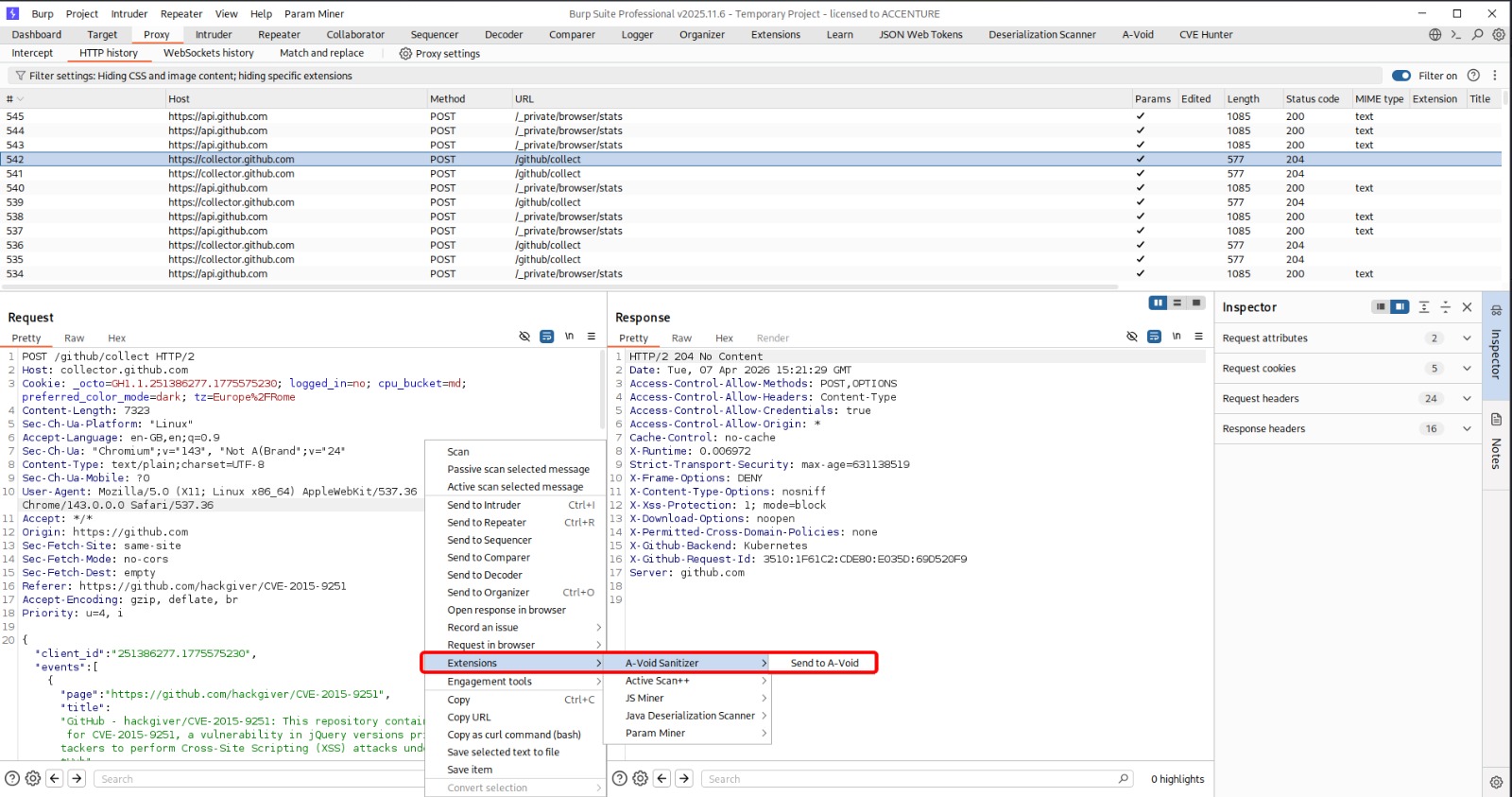
The workflow is straightforward: right-click any request anywhere in Burp and select Send to A-Void from the context menu. The extension loads that specific request and its response into a dedicated tab, fills in the target bar (host, port, HTTPS), and runs the sanitization automatically. It does not intercept or sanitize all traffic — it only processes the individual request you explicitly send to it.
The main interface is split into four quadrants: top-left shows the raw request, top-right the raw response, bottom-left the sanitized request, bottom-right the sanitized response. The sanitized versions are read-only, with every SANITIZED_DATA_N placeholder highlighted in gold so you can immediately see what was replaced.
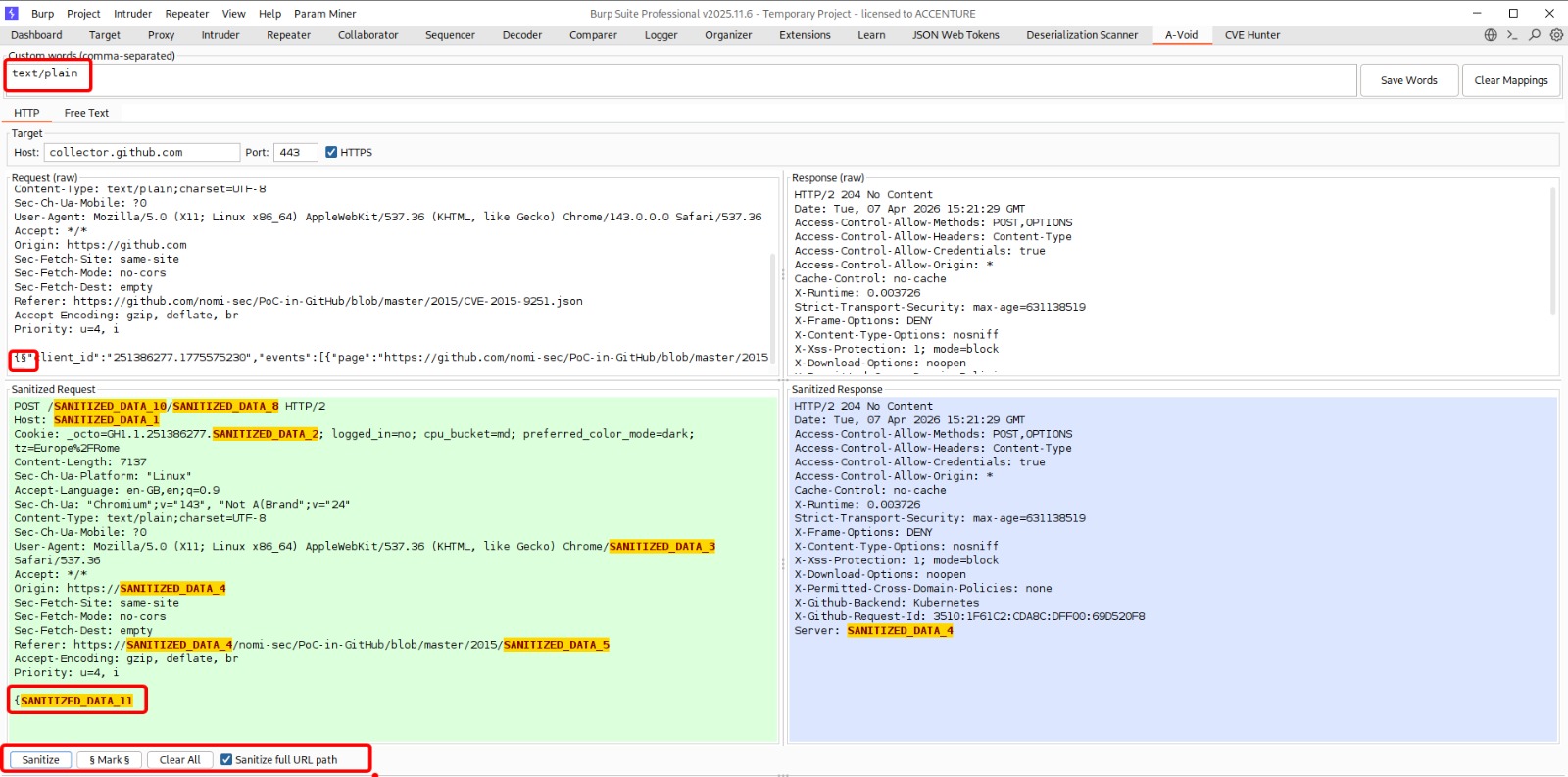
The sanitization engine recognizes different body formats and handles them accordingly:
- JSON bodies are parsed recursively — keys are preserved, only values are sanitized. Fields with name-related keys (
nome,name,customer,username, etc.) get their entire value replaced directly - Base64-encoded bodies are decoded, sanitized, and re-encoded
- URL-encoded bodies have their values sanitized while keeping parameter names intact
- Plain text runs through the full detection chain as-is
Headers are sanitized selectively: the header name stays intact, only the value gets processed. Request lines (GET /path HTTP/1.1) have their URL path and query parameters sanitized while keeping the method and protocol version.
The extension also includes a Free Text tab for sanitizing arbitrary text — logs, config snippets, notes, anything you want to clean up before sharing with an LLM without needing a full HTTP message.
The Mark Feature
Sometimes the automatic detection isn’t enough. Maybe you have a custom internal identifier format, or a value that doesn’t match any standard pattern but is still sensitive. Select the text in the raw request or response area, click the Mark button, and A-Void wraps it with section-sign markers. On the next sanitization pass, marked values are replaced with their own SANITIZED_DATA_N placeholder.
Placeholder Consistency
A-Void maintains a global replacement map for the entire session. If the same IP address appears in both the request and the response, it gets the same placeholder number in both. This means the sanitized output still makes structural sense — you can tell that the IP in the Host header is the same one referenced in the response body, even though the actual value is gone.
The mapping persists until you click Clear Mappings or restart the extension.
Installation
A-Void is a Jython-based Burp extension. You need:
- Jython standalone JAR — e.g.,
jython-standalone-2.7.4.jar - In Burp: Extender > Options > Python Environment — point it to the Jython JAR
- Extender > Extensions > Add — Extension type: Python, select
A-Void.py
The extension registers as a new tab called A-Void and adds a context menu entry to every request in Burp.
Why This Exists
LLMs are incredibly useful during assessments — explaining weird server behavior, suggesting payloads, helping decode custom encoding schemes. But every time you paste a raw request into a chat window, you’re potentially leaking client data, internal infrastructure details, and session credentials to a third-party service.
A-Void lets you use AI tools without that risk. Sanitize first, share second. The structure of the traffic stays intact for the LLM to understand, but the sensitive content is gone.
Built for Burp Suite. Requires Jython (e.g., jython-standalone-2.7.4.jar). Use responsibly.